
Stop Fearing the Button: How AI Intent Validation Makes Network Automation Safe
Every network engineer knows the feeling. Finger hovering over “Execute,” heart rate slightly elevated, wondering what might break. Did you account for every edge case? Will that regex actually catch the right output? What if the device responds differently than expected?
This is the “fear of the button” — and it’s holding back network automation adoption across the industry. The tools exist. The workflows are built. But the confidence to press “go” on production infrastructure? That’s harder to come by.
Traditional pre-checks are tedious and error-prone. Manual verification doesn’t scale. And most automation frameworks offer binary pass/fail with no real understanding of what they’re checking.
What if your automation could actually understand what you’re trying to validate?
Enter AI Intent Validation — a fundamentally different approach to pre-flight checks that uses large language models to interpret network state against natural language intent statements.
What is Intent Validation?
Intent Validation flips the script on traditional automation checks. Instead of writing complex regex patterns to parse command output, you simply express your intent in plain English:
- “All BGP neighbors should be established”
- “All OSPF neighbors should be in FULL state”
- “No interface should have CRC errors above 100”
The AI interprets the actual command output from your network devices and determines whether the intent is satisfied — not through pattern matching, but through understanding.
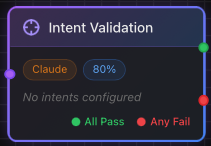 The Intent Validation node integrates directly into your automation workflow
This is the key insight: AI understands meaning, not just patterns. When a Cisco device and an Arista device return differently formatted BGP output, traditional regex breaks. AI Intent Validation reads both and knows whether the neighbors are healthy.
The Intent Library — 30+ Pre-Built Validations
You don’t have to start from scratch. AutomateNetOps.AI includes a comprehensive Intent Library with 30+ production-ready intents across five categories:
Routing Intents
Validate your routing protocol health before making changes:
- All BGP neighbors should be established
- All OSPF neighbors should be in FULL state
- Device should have route to {network}
- No BGP sessions should be flapping (state changes > 3 in last hour)
- All eBGP sessions should be established with expected AS numbers
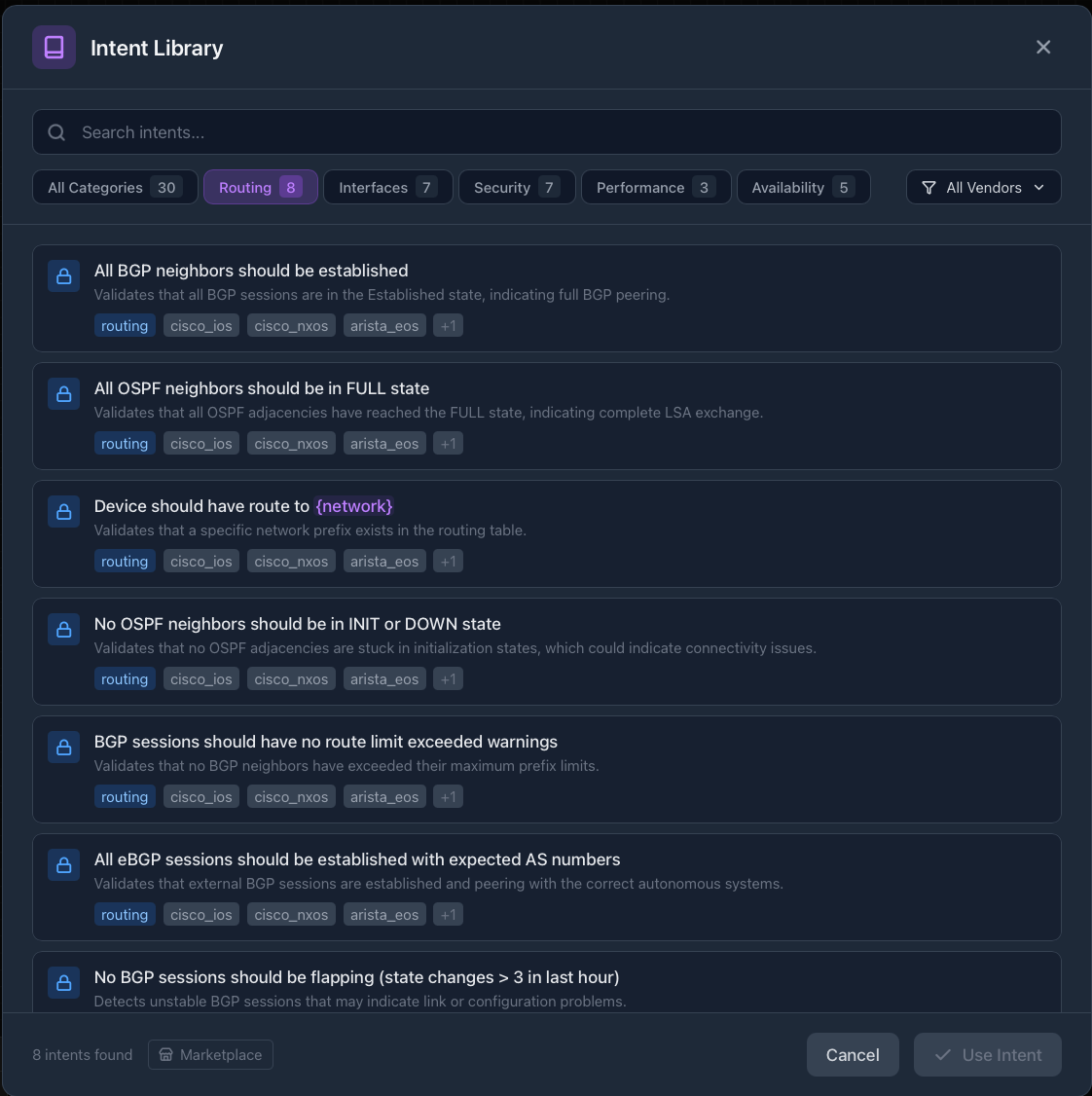 8 routing intents covering BGP and OSPF validation
Security & Compliance Intents
Automate your security validation — stop manually checking configs:
- ACL {name} should have permit rule for {network}
- SSH should be enabled on VTY lines
- No management interfaces should be in the default VLAN
- SNMP community strings should not contain “public” or “private”
- AAA/TACACS server should be reachable
- NTP should be synchronized within {offset_ms}ms
- Logging should be configured to send to {syslog_server}
 7 security intents for automated compliance validation
Interface & Availability Intents
Ensure your infrastructure is healthy before changes:
- No interface should have CRC errors above {threshold}
- All trunk interfaces should be operational
- HSRP/VRRP state should be {expected_state}
- Spanning tree should show no topology changes in last hour
- All uplinks should be in bundle and active
- All power supplies should be operational
- Fan status should show no failures
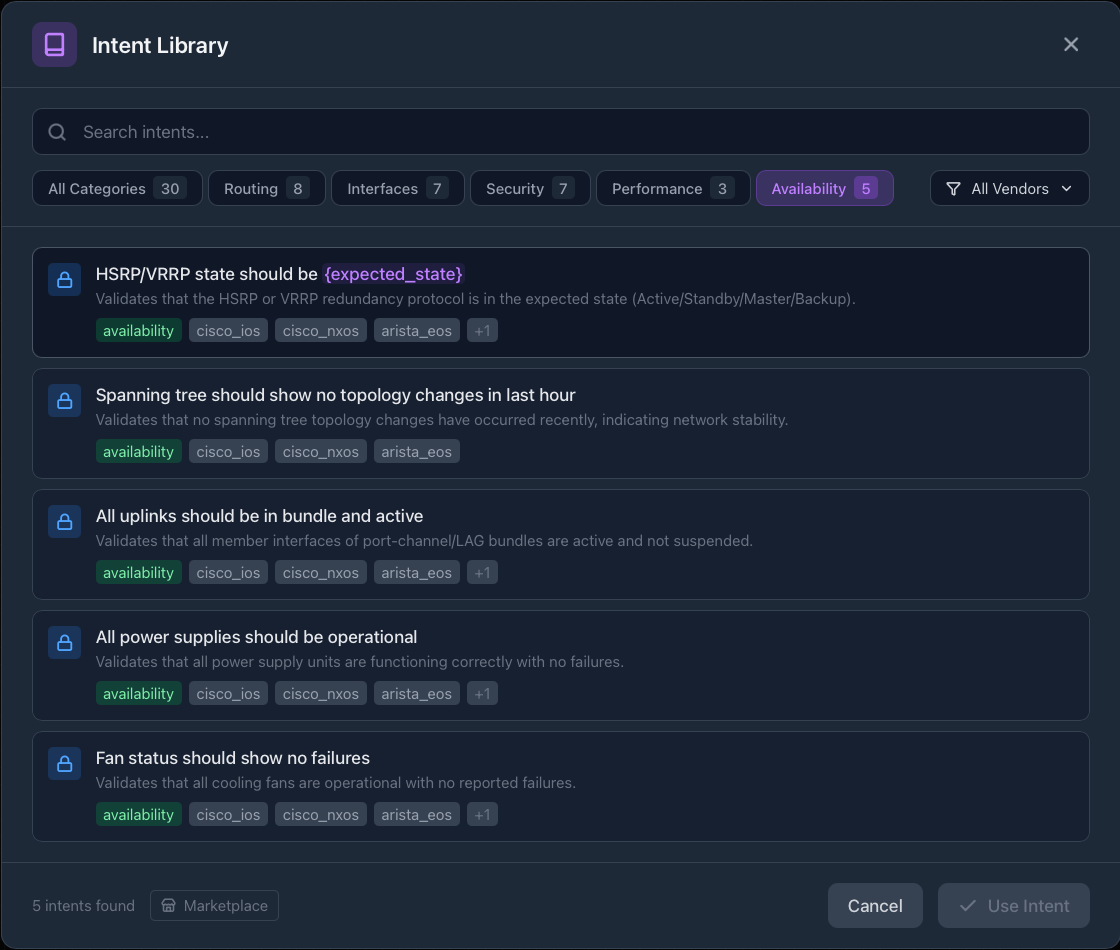 Availability intents ensure redundancy is working before changes
Performance Intents
Catch resource constraints before they cause outages:
- CPU utilization should be below {threshold}%
- Memory utilization should be below {threshold}%
- No interface queue should have drops exceeding {threshold}
Multi-Vendor Support
Each intent supports multiple platforms out of the box:
- Cisco IOS
- Cisco NX-OS
- Arista EOS
- Juniper (and more)
No vendor-specific parsing code required. The AI handles the translation.
How It Works — AI Configuration
Setting up Intent Validation is straightforward. The node configuration panel gives you full control:
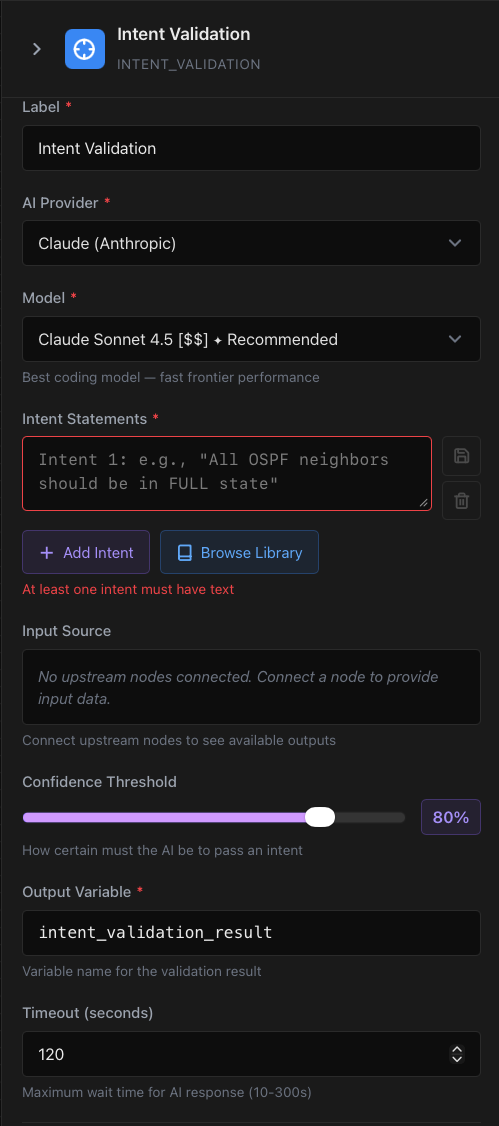 Configure the AI provider, model, and confidence threshold for your validation
Choose Your AI Provider
Select from leading AI providers:
- Claude (Anthropic) — Recommended for technical accuracy
- OpenAI GPT-4 — Alternative option
Model Selection
Claude Sonnet 4.5 is the recommended model — it’s optimized for code and technical output, making it ideal for interpreting network command outputs. The “fast frontier performance” delivers quick results without sacrificing accuracy.
Confidence Threshold
This is where AI Intent Validation really shines. Unlike binary pass/fail, you get a confidence score.
Set your threshold (default: 80%). If the AI is only 60% confident the intent is satisfied but your threshold is 80%, it fails safely. This prevents false positives from ambiguous outputs.
Custom Intents
Don’t see what you need in the library? Write your own intent in plain English. The AI will interpret it against whatever command output you provide.
Pro tip: Start with library intents, then customize parameters like
{threshold}and{expected_state}for your environment.
Traditional Validation vs. AI Intent Validation
The shift from traditional validation to AI-powered intent checking isn’t incremental — it’s transformational.
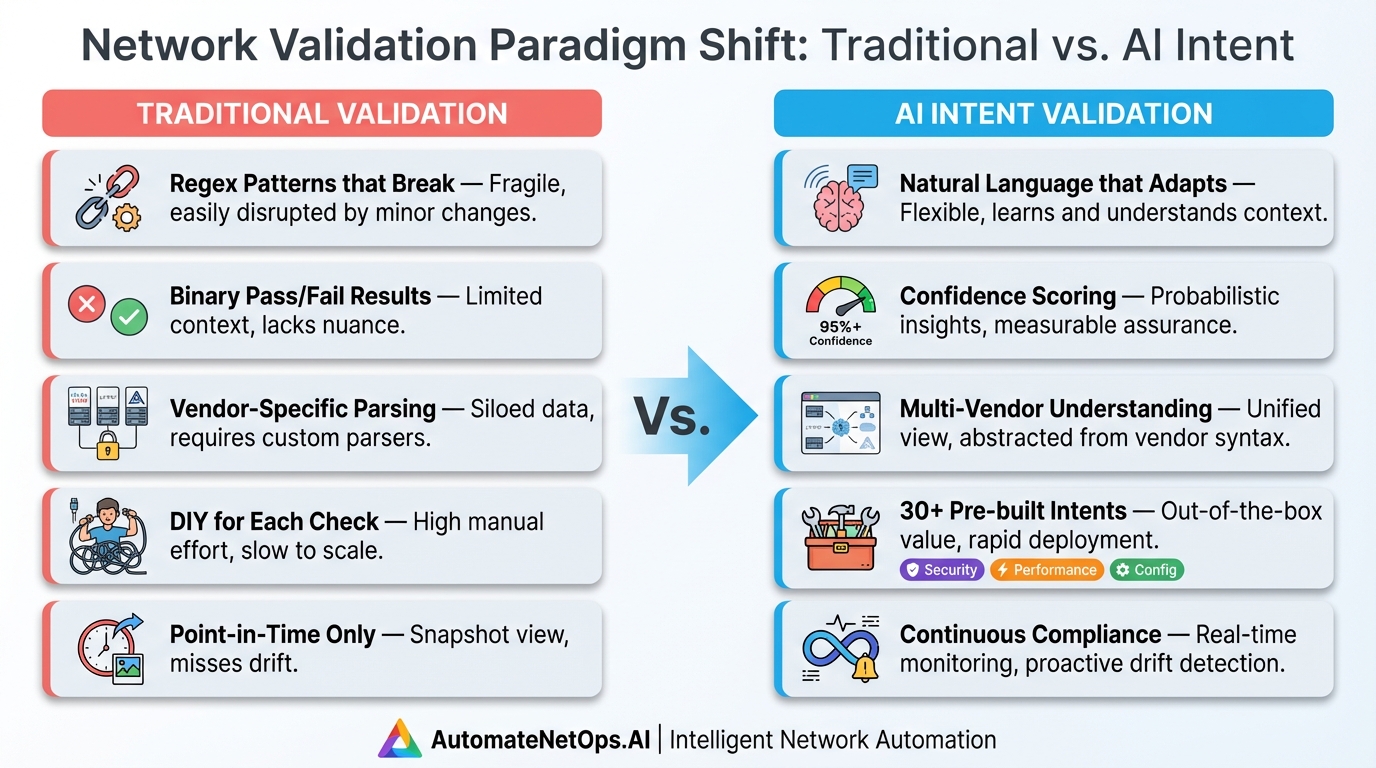 Click to zoom — The evolution from brittle scripts to intelligent validation
| Feature | Traditional Validation | AI Intent Validation |
|---|---|---|
| Logic Basis | Regex & manual checks | Natural language meaning |
| Vendor Support | Specific/custom parsing per vendor | Multi-vendor out-of-the-box |
| Results | Brittle pass/fail | Confidence scoring |
| Maintenance | Breaks when output changes | Adapts to variations |
| Expertise Required | Deep programming knowledge | Plain English |
| Pre-built Checks | DIY everything | 30+ ready-to-use intents |
The bottom line: AI Intent Validation eliminates the “fear of the button” by giving engineers actual confidence in what they’re validating.
Continuous Compliance — The Metrics Dashboard
Intent Validation isn’t just for pre-change checks. Run validations continuously and track compliance over time.
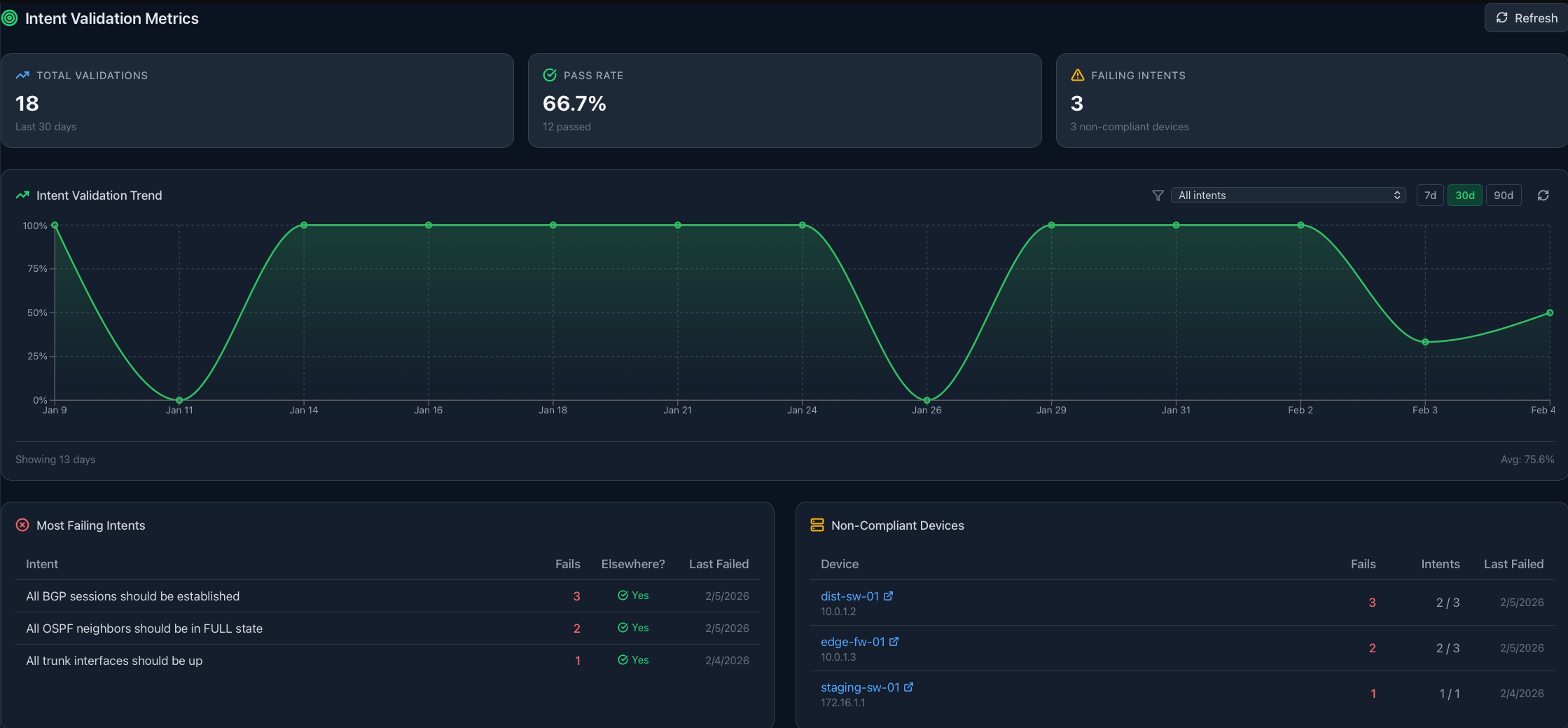 The Intent Validation Metrics dashboard shows pass rate trends and non-compliant devices
What You Can Track
- Total Validations — How many checks have run
- Pass Rate — Overall compliance percentage
- Failing Intents — Which checks are failing most
- Non-Compliant Devices — Pinpoint problem devices
- Historical Trends — 7-day, 30-day, 90-day views
Use Cases
Audit Reporting: Generate compliance reports showing validation history and trends.
Drift Detection: Catch configuration drift before it causes incidents.
Proactive Monitoring: Know when a device falls out of compliance, not after an outage.
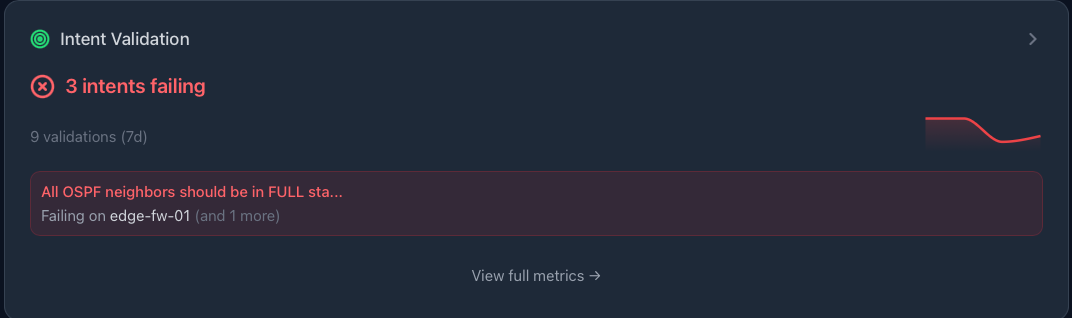 Dashboard widgets surface failing intents across your infrastructure
Real-World Example: Pre-Change BGP Validation
Let’s walk through a practical scenario. You’re about to push a BGP configuration change to your edge routers. Before executing, you want to validate that all existing BGP sessions are healthy.
Traditional approach:
- SSH to each device
- Run
show ip bgp summary - Parse output with regex
- Hope your regex handles all vendor variations
- Manually review results
- Pray you didn’t miss anything
AI Intent Validation approach:
- Add Intent Validation node to your workflow
- Click “Browse Library”
- Select “All BGP neighbors should be established”
- Set confidence threshold to 80%
- Connect to your device pool
- Connect downstream to your configuration change node
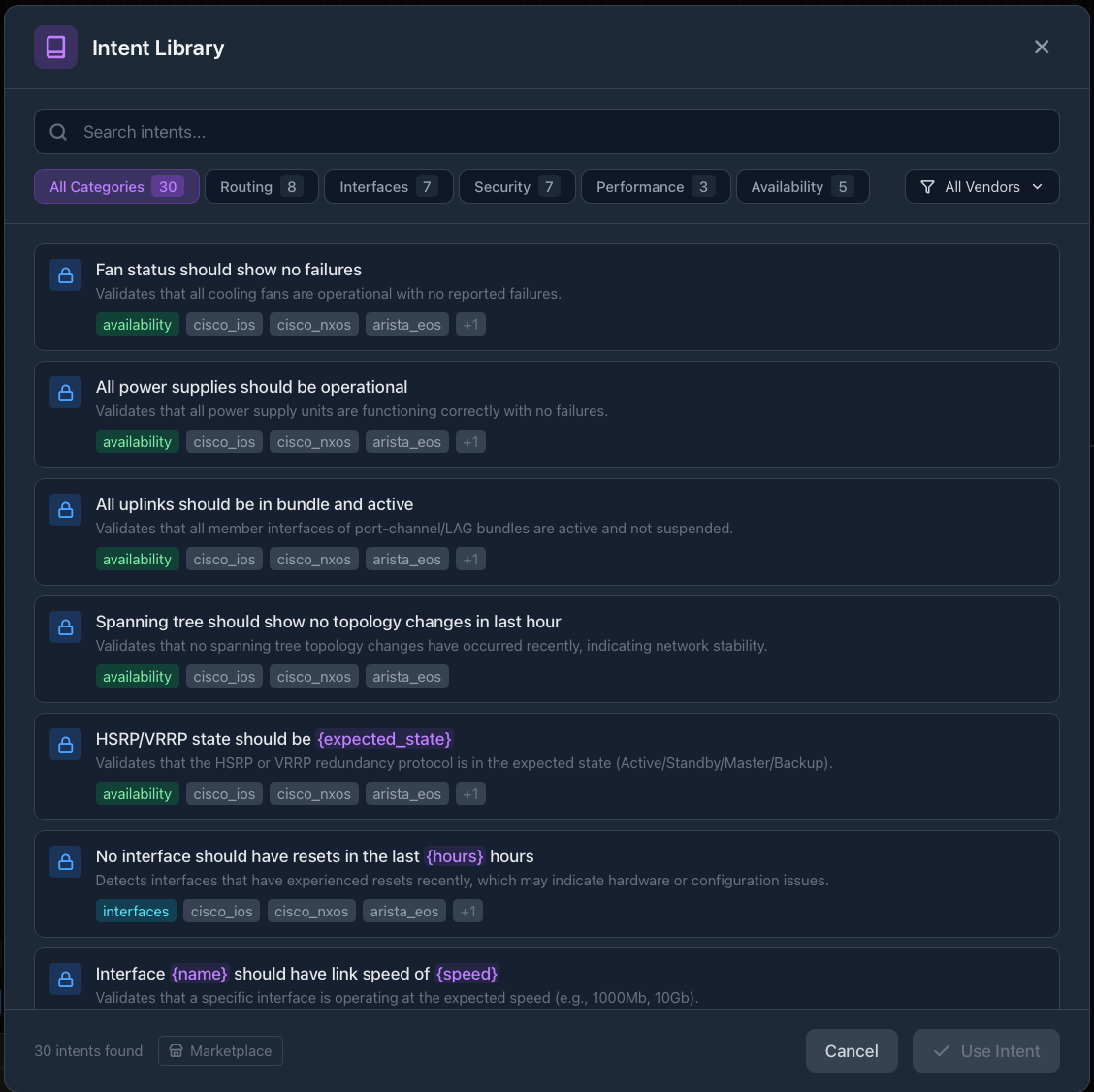 Browse 30+ intents across 5 categories — no regex required
If validation fails, the workflow aborts safely. If it passes with high confidence, you proceed knowing the foundation is solid.
The difference: You didn’t write regex. You didn’t parse JSON. You just told the AI what you expect, and it figured out the rest.
Why This Matters — The Bigger Picture
Network automation adoption has stalled at many organizations — not because the technology isn’t ready, but because the risk feels too high. Engineers have been burned by automation that broke production. They’ve spent hours debugging regex that worked in the lab but failed in production.
AI Intent Validation changes the equation:
- Risk Reduction: Pre-flight checks that actually understand context
- Accessibility: No programming expertise required
- Confidence: Know what you’re validating, not just that something passed
- Compliance: Continuous validation, not point-in-time checks
And because this runs on the AutomateNetOps.AI hybrid architecture, your credentials never leave your network. The AI validation happens, but your secrets stay in your local HashiCorp Vault. Zero-trust security with cloud-grade intelligence.
Get Started
Ready to stop fearing the button?
- Start with the Intent Library — 30+ pre-built intents covering routing, security, interfaces, performance, and availability
- Set your confidence thresholds — Tune sensitivity to your environment
- Build validation into your workflows — Make it automatic, not an afterthought
- Track compliance over time — Use the metrics dashboard for continuous monitoring
AI Intent Validation is available now in AutomateNetOps.AI. Your network automation deserves pre-flight checks that actually understand what they’re checking.
Have questions about AI Intent Validation? Contact our team or explore our documentation.
Tags: AI automation, BGP, intent-based networking, network compliance, OSPF, pre-flight validation
Categories: AI Features, Network Automation
Updated:
You may also enjoy

Every vendor in 2026 has “AI-powered” somewhere on the homepage. It’s the checkbox that marketing demands and engineering delivers with a shrug — a chatbot b...
About Me

Featured Articles
Ready to Automate?
See how AutomateNetOps.AI can transform your network operations with zero-trust security.