
The First AI-Native Network Automation Platform
Every vendor in 2026 has “AI-powered” somewhere on the homepage. It’s the checkbox that marketing demands and engineering delivers with a shrug — a chatbot bolted onto a legacy CLI, a config generator that’s never seen your topology, a log summarizer that produces paragraphs nobody reads.
You’ve seen this movie. You fire up the shiny new “AI feature,” ask it to generate a backup workflow, and it produces something that references device pools that don’t exist, credential stores it can’t reach, and node types it invented. You spend more time fixing the AI’s output than you would have spent building the workflow from scratch.
The problem isn’t AI itself. The problem is AI that has zero context about your network. An LLM that doesn’t know your device inventory, your credential model, your naming conventions, or your execution history is just a very expensive autocomplete.
There’s a fundamental difference between “AI-enabled” and “AI-native,” and it starts with architecture. AutomateNetOps.AI was built from day one with AI woven into every layer — not sprinkled on top as a marketing feature. And that difference changes everything about how network engineers work.
What “AI-Native” Actually Means
Let’s be specific, because “AI-native” could easily become the next empty buzzword.
AI-native means the AI is built into the data model, the execution engine, and the UI from the ground up. It means the AI has direct access to your device inventory, your credential pools, your workflow state, your execution history, and your uploaded knowledge base. It doesn’t ask you to copy-paste context into a prompt. It already knows.
This context is what separates “generate a config” from “generate a config for YOUR 47 Cisco Catalyst 9300s using YOUR credential pool ‘prod-tacacs’ with YOUR naming convention ‘{site}-{role}-{rack}{unit}’.” The first is a party trick. The second is useful.
And because AutomateNetOps.AI runs on a hybrid cloud-to-on-premise architecture, the AI gets full context without compromising security. Your credentials never leave your network. The intelligence lives in the cloud (or locally, if you prefer). The secrets stay in your HashiCorp Vault.
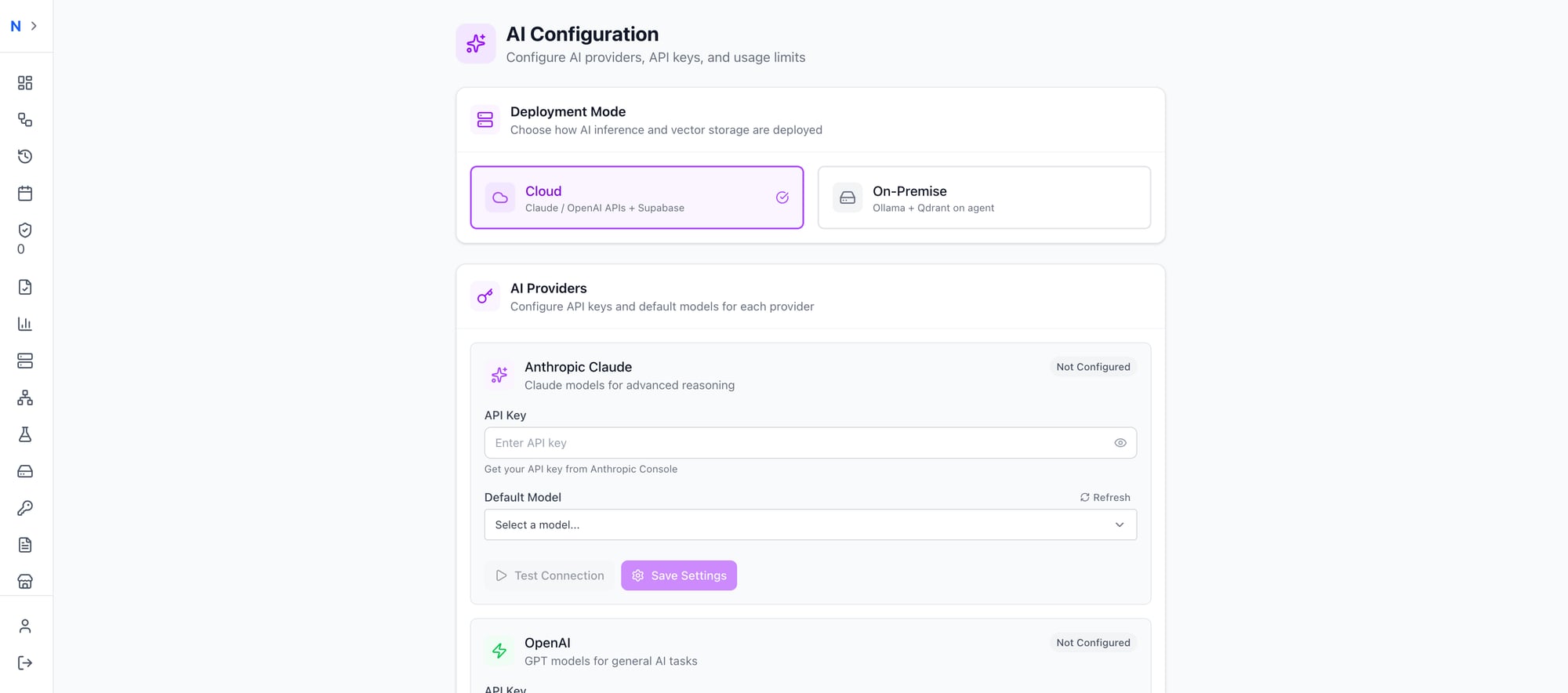 Choose your deployment: cloud AI APIs or fully air-gapped with Ollama running on your own infrastructure
AI Workflow Generation — From Words to Workflows
This is the flagship feature, and it’s the one that makes people stop mid-demo and say “wait, that actually worked?”
Here’s what it looks like. You open the workflow designer, click the AI Assistant tab, and type what you want in plain English:
“Backup running config on all Cisco routers”
Ten seconds later, the AI comes back with a validated workflow: three nodes, 95% confidence, ready to apply with one click. Start → Backup Running Config → End. Fully connected. Fully configured. Using your actual device pools and credential stores.
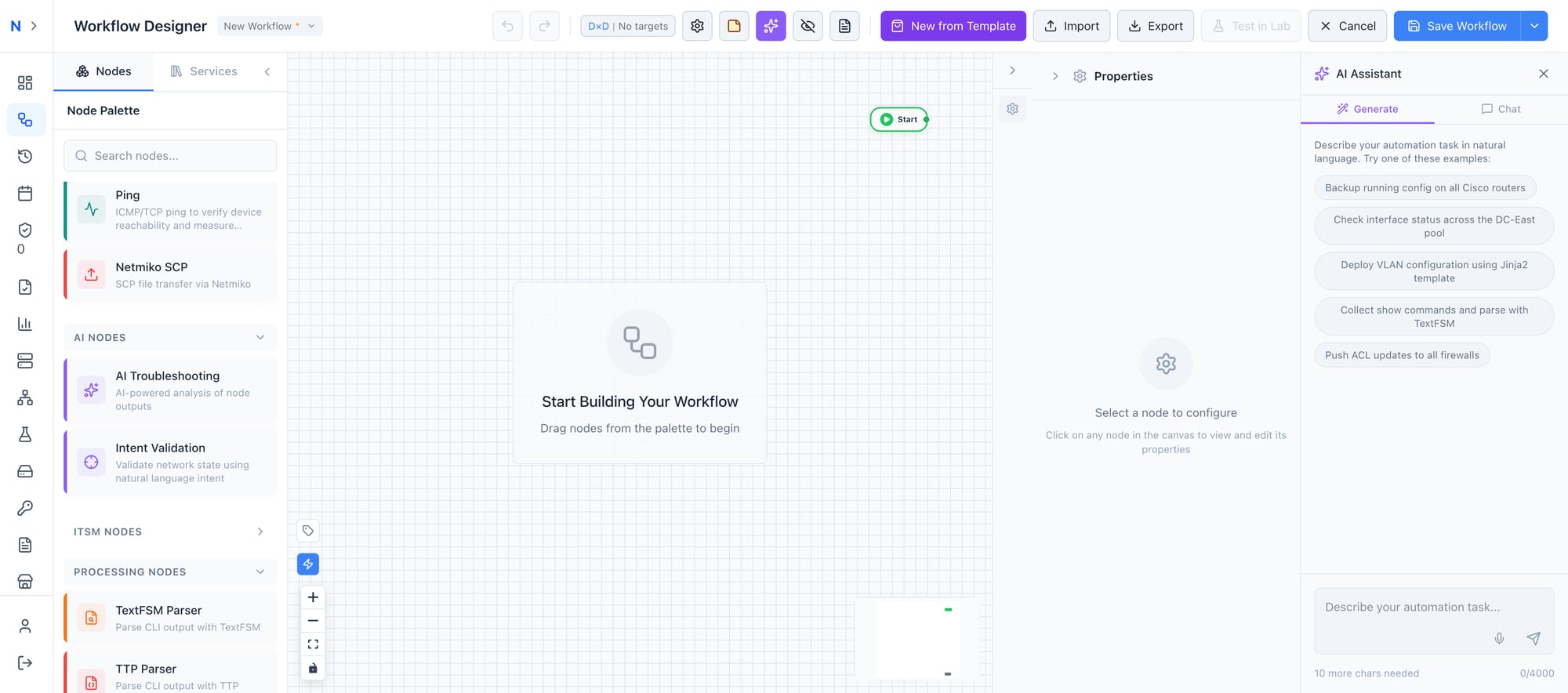 Describe your automation task in natural language — the AI handles the rest
The generation isn’t guessing. The AI knows every available node type in the platform, your existing workflow patterns, and your device inventory. When it creates a “Backup Running Config” node, it’s selecting from the actual node catalog, not hallucinating a node that doesn’t exist.
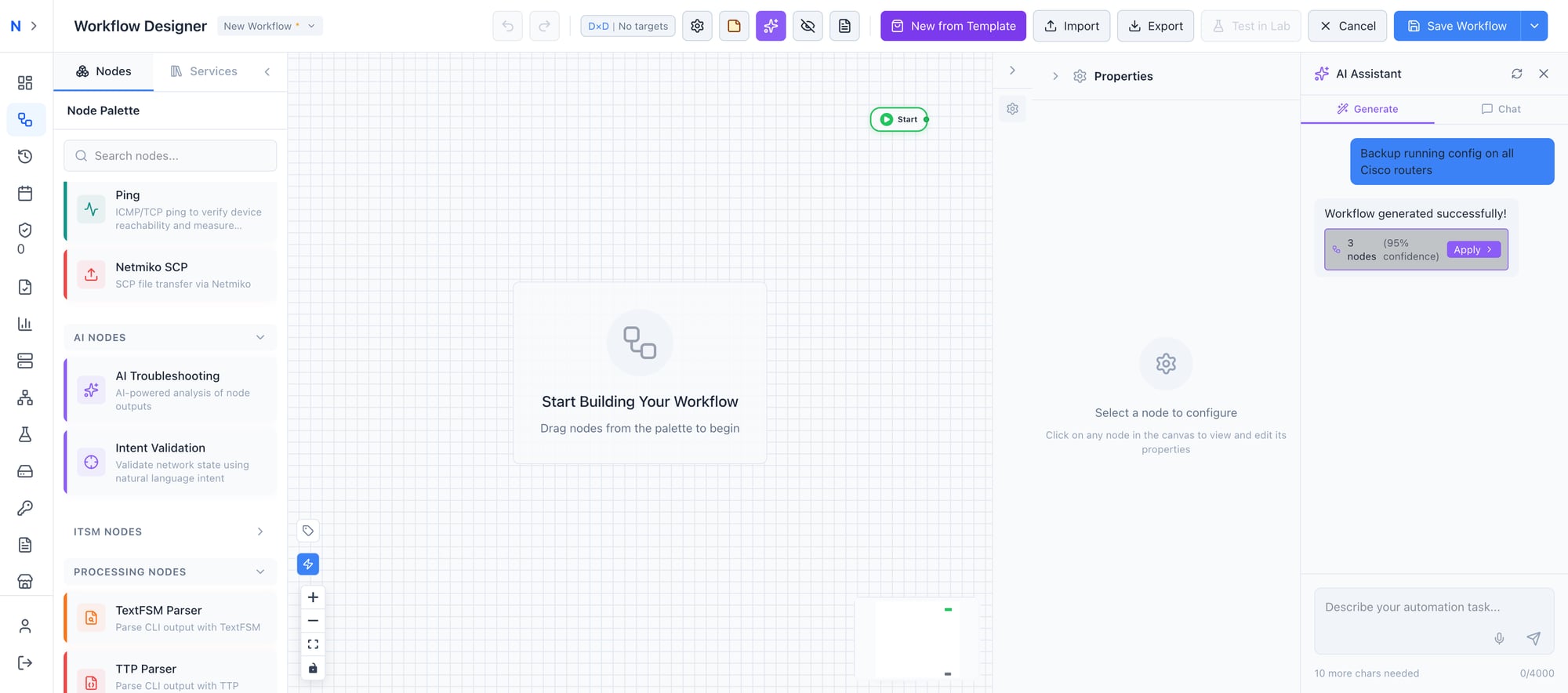 From plain English to a validated workflow in under 10 seconds
Click Apply, and the workflow appears on your canvas — nodes placed, connections drawn, configurations populated. You can run it immediately or refine it further.
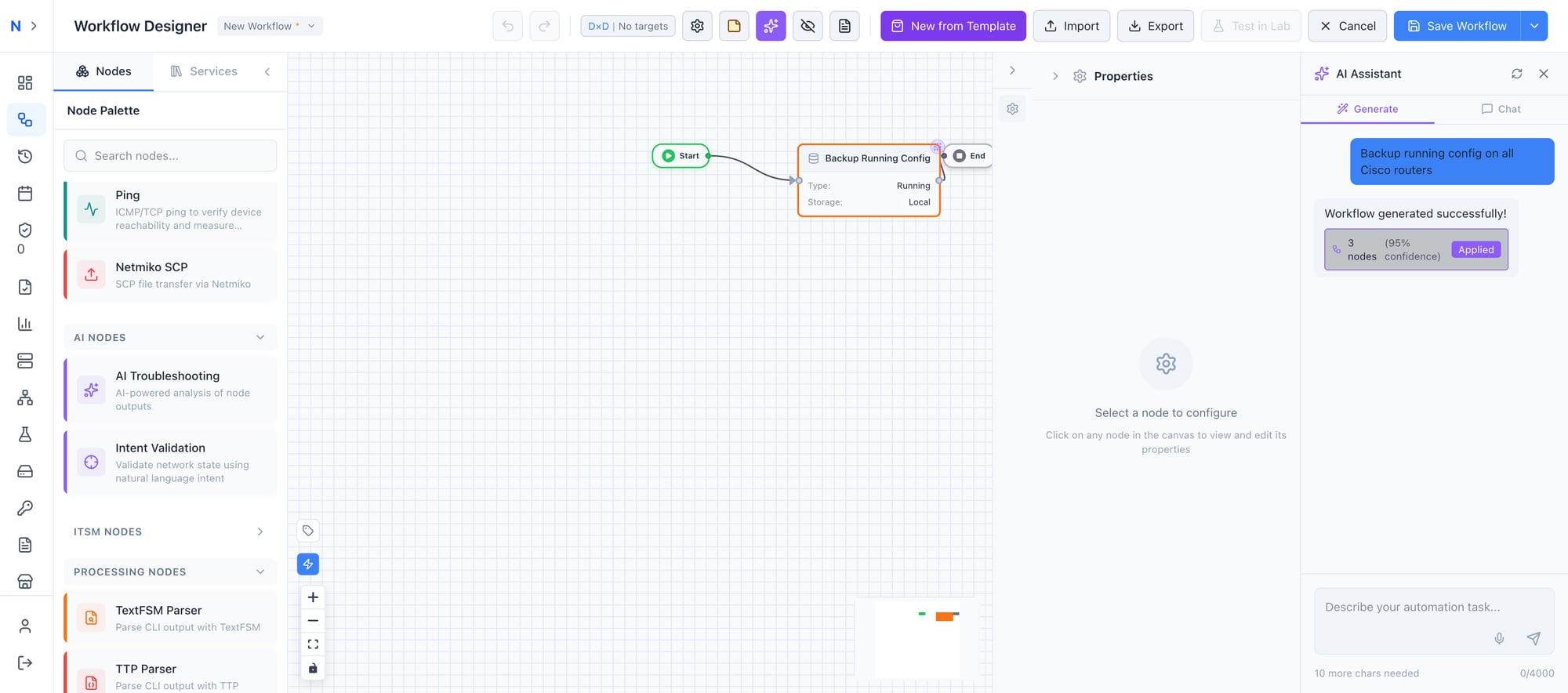 One click to apply — Start, Backup Running Config, End — fully connected and configured
And it’s iterative. Don’t like the first result? Refine it: “Now add error handling and email notification on failure.” The AI adds conditional nodes, an error branch, and a notification node — all wired into the existing graph. No starting over.
The cost? Less than $0.10 per generation. When a workflow that used to take 30 minutes to build takes 30 seconds, the ROI isn’t theoretical — it’s immediate.
Pro tip: Start with simple prompts and iterate. “Backup configs on all Cisco routers” → “Add TextFSM parsing” → “Add error handling” → “Send Slack notification on failure.” Each refinement builds on the last.
AI Troubleshooting Node — Your Expert on Every Workflow
The AI Troubleshooting node is where things get serious. Drop one into any workflow, and it analyzes upstream output with the reasoning capability of a senior network engineer — except it never sleeps, never forgets your runbooks, and processes output in seconds.
Here’s a real-world example: a Switch Compliance Check workflow.
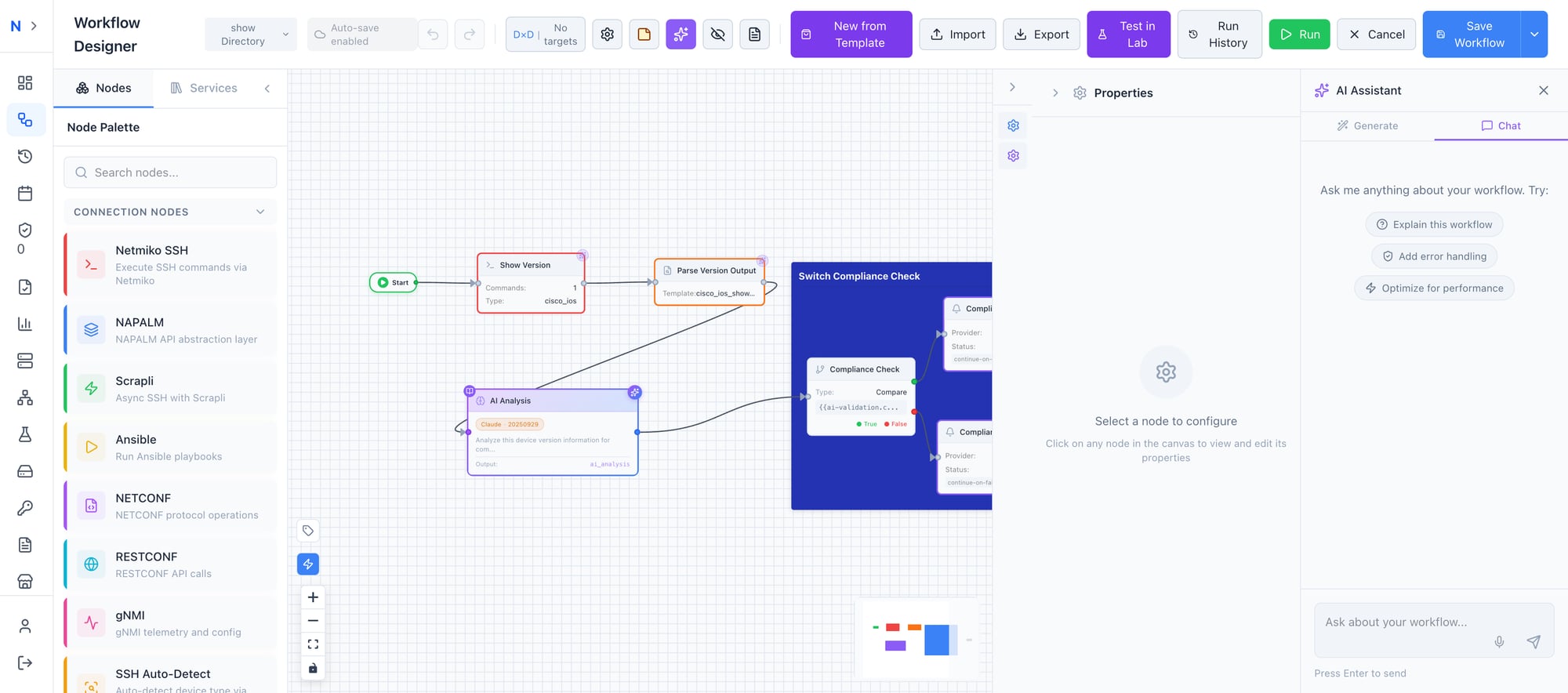 A real compliance workflow: Show Version → Parse → AI Analysis → Conditional routing based on AI findings
The workflow runs show version via Netmiko SSH, parses the output through TextFSM, and feeds the structured data into an AI Analysis node. The AI evaluates the firmware version, hardware model, and uptime against your compliance requirements — then routes the result through conditional logic. Compliant devices get logged. Non-compliant devices trigger remediation or notification workflows.
The AI Analysis node configuration gives you full control:
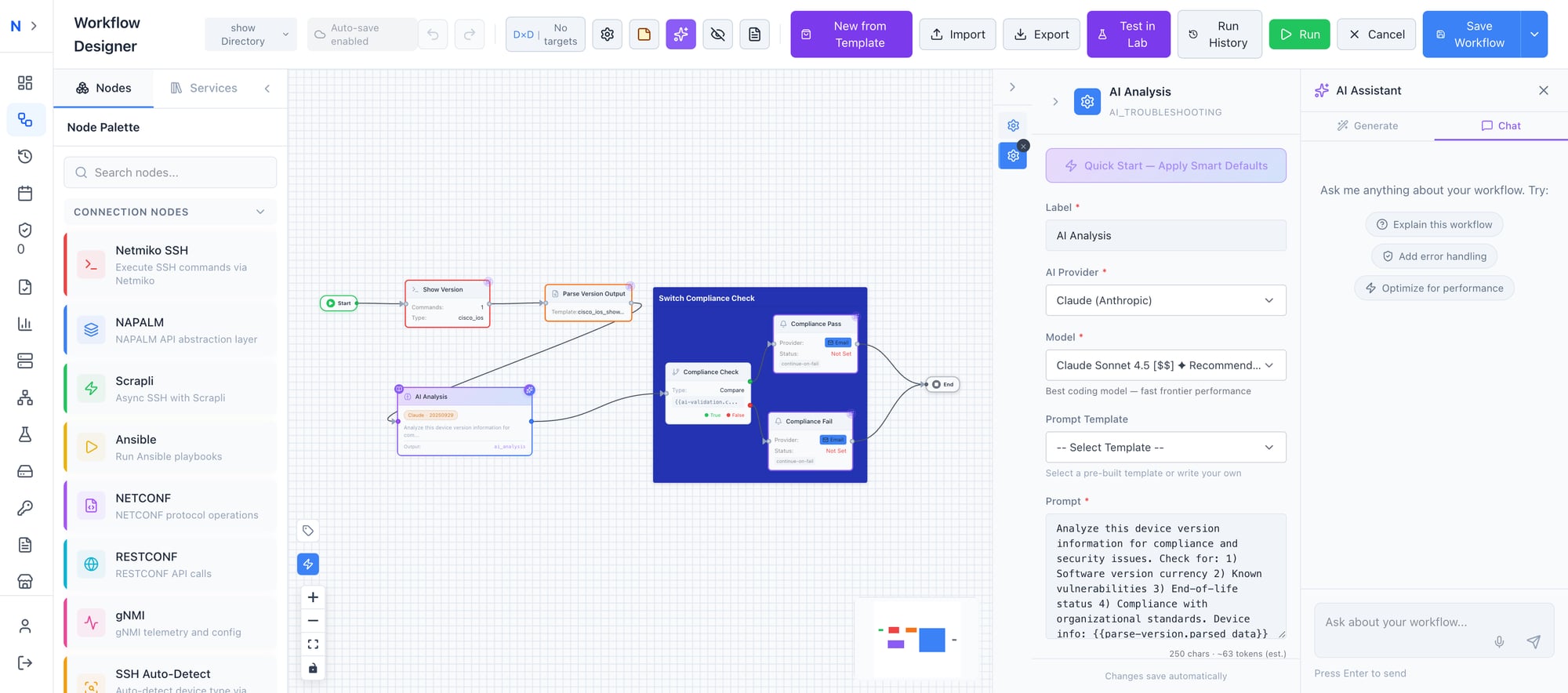 Configure the AI provider, model, and custom prompt — the node analyzes upstream output and returns structured findings
- Choose your provider — Claude (Anthropic), OpenAI, Ollama, or Grok
- Select your model — Claude Sonnet 4.5 is recommended for technical accuracy
- Write a custom prompt or select from pre-built templates:
- Troubleshoot Error — Root cause analysis with remediation steps
- Explain Config — Generate human-readable documentation from config output
- Validate Security — Check output against security baselines
- Health Check — Overall device health assessment
- Enable knowledge base search — The AI automatically references your uploaded runbooks and SOPs
The output is structured, not just a wall of text. It feeds directly into downstream nodes — conditional branches, notification triggers, ticket creation systems. The AI becomes a decision engine inside your workflow, not a sidecar you have to manually interpret.
Knowledge Base (RAG) — Your Runbooks, Powered by AI
Every network team has institutional knowledge locked in documents that nobody can find when they need them — runbooks in SharePoint, SOPs in Confluence, vendor docs in someone’s Downloads folder, historical incident reports in email threads.
AutomateNetOps.AI’s Knowledge Management system changes that. Upload your documentation, and the platform automatically chunks, indexes, and stores it in a vector database. When an AI Troubleshooting node runs, it searches your knowledge base automatically — and cites its sources.
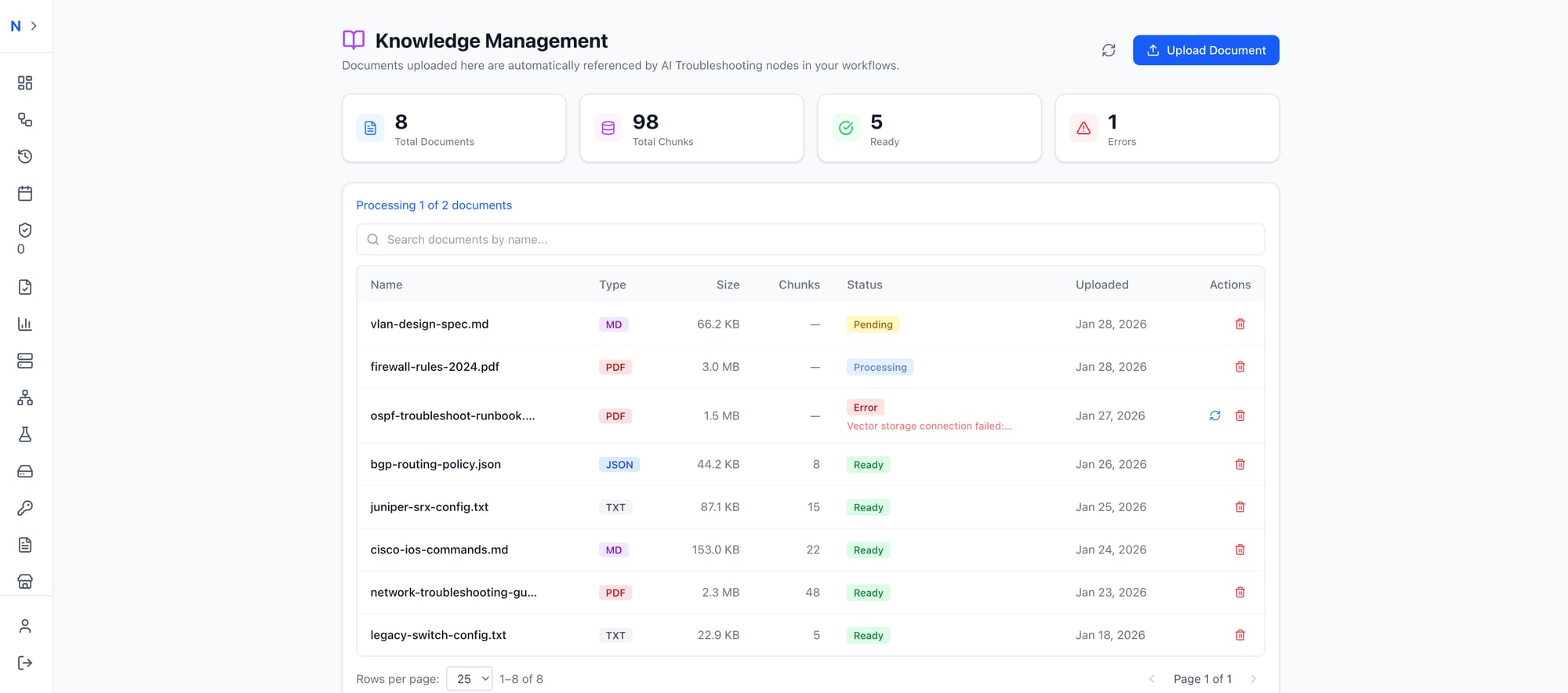 Upload your network documentation — the AI searches it automatically when troubleshooting or validating
The system supports multiple formats: Markdown, PDF, JSON, and TXT. Upload your Cisco TAC runbooks, your internal change management procedures, your historical incident postmortems. The AI doesn’t just summarize them — it uses them as evidence when making recommendations.
When the AI says “the firmware version on this switch is below your minimum baseline,” it’s not guessing. It’s referencing the document you uploaded that defines your baseline. And it tells you which document, so you can trace every recommendation back to your own standards.
Air-gapped option: The vector store runs on Qdrant, which can be deployed locally alongside Ollama. Your documents, your embeddings, your AI — all on your infrastructure. Zero external calls.
Pro tip: Upload your vendor TAC guides alongside your internal SOPs. The AI will cross-reference vendor recommendations with your specific procedures, giving you best-of-both-worlds analysis.
Intent Validation — Plain English Pre-Flight Checks
If the AI Troubleshooting node is your expert, Intent Validation is your safety net. Express your expectations in plain English — “All BGP neighbors should be established,” “CPU utilization below 80%,” “No interface CRC errors above 100” — and the AI validates actual device output against your intent.
No regex. No TextFSM templates. No vendor-specific parsing code. Just plain English and a confidence score.
The platform ships with 30+ pre-built intents across routing, security, interfaces, performance, and availability — covering everything from OSPF neighbor state to power supply health. And because the AI understands meaning rather than matching patterns, the same intent works across Cisco IOS, NX-OS, Arista EOS, and Juniper without modification.
This is a deep topic, and we’ve written an entire article on it.
Pro tip: Read our deep-dive on Intent Validation for the full breakdown, including the 30+ intent library, confidence scoring, and the compliance metrics dashboard.
AI Copilot — Your Persistent Workflow Assistant
The AI Copilot is a persistent assistant that lives inside the workflow designer — always aware of your current context, always ready to help.
This isn’t a generic chatbot. The Copilot sees your entire workflow graph, the selected node’s configuration, recent execution results, and all available variables. When you ask “Why did node 3 fail?”, it doesn’t ask you to paste logs. It already has them.
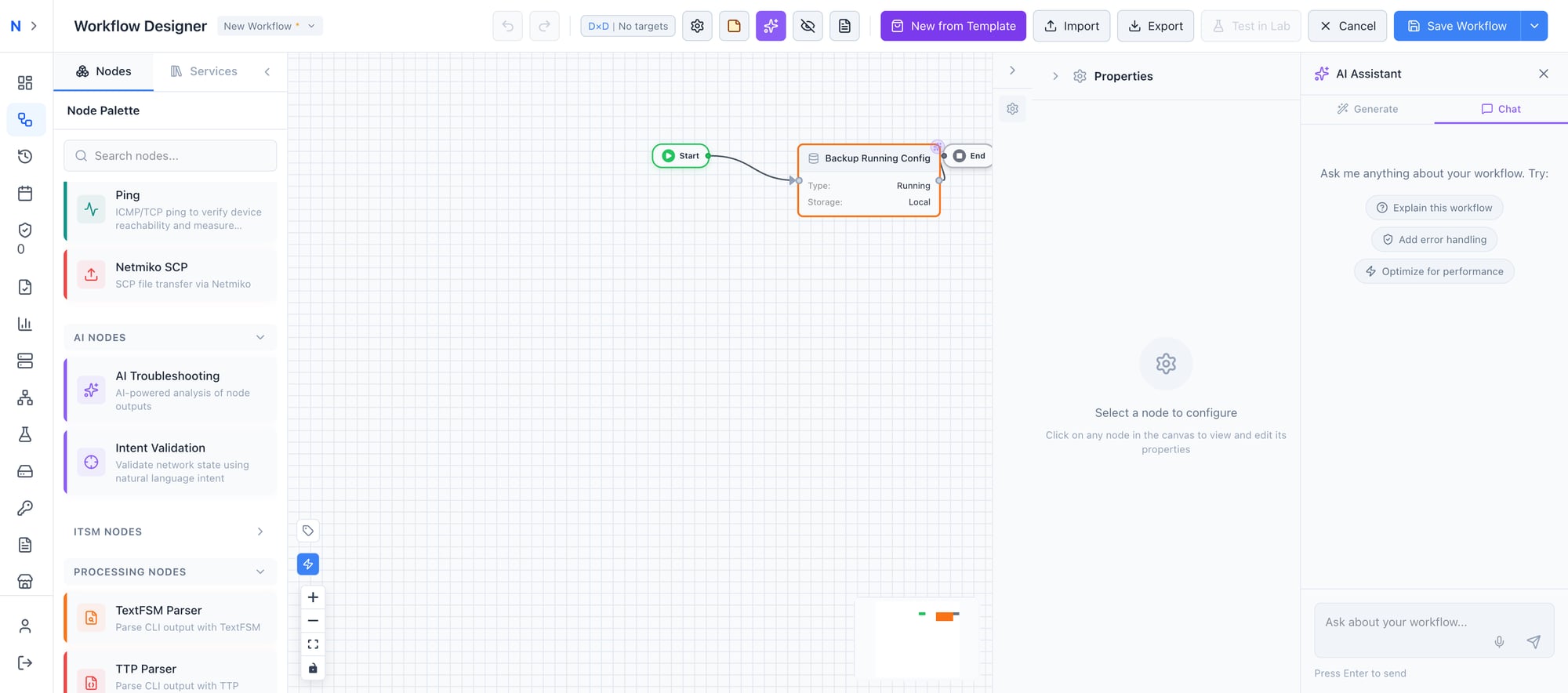 The AI Copilot understands your entire workflow context — ask anything, apply changes with one click
What you can ask:
- “Explain this workflow” → Structured breakdown of every node and connection
- “Add error handling” → The Copilot suggests specific changes and applies them with one click
- “Why did node 3 fail?” → Analyzes execution results and pinpoints the issue
- “What’s the OSPF config for our spine switches?” → Searches your knowledge base and returns relevant documentation
One-click suggestion buttons — “Explain this workflow,” “Add error handling,” “Optimize for performance” — give you common operations without typing. And full undo support means every AI change is reversible with Ctrl+Z. Experiment freely.
The Copilot is especially powerful for onboarding. A new team member can open any workflow, click “Explain this workflow,” and get a complete walkthrough — what each node does, how data flows between them, what variables are available. The tribal knowledge that used to live in one engineer’s head is now accessible to the entire team.
Your AI, Your Rules
Security isn’t an afterthought here. You choose the AI provider, the model, and the deployment mode — per-node if needed. Run Claude for your compliance workflows and Ollama for your air-gapped environments, all within the same platform.
| Provider | Best For | Deployment |
|---|---|---|
| Claude (Anthropic) | Best reasoning — recommended default | Cloud API |
| OpenAI (GPT-4) | Broad compatibility | Cloud API |
| Ollama (Local) | Air-gapped deployments | On-Premise |
| Grok (xAI) | Alternative provider | Cloud API |
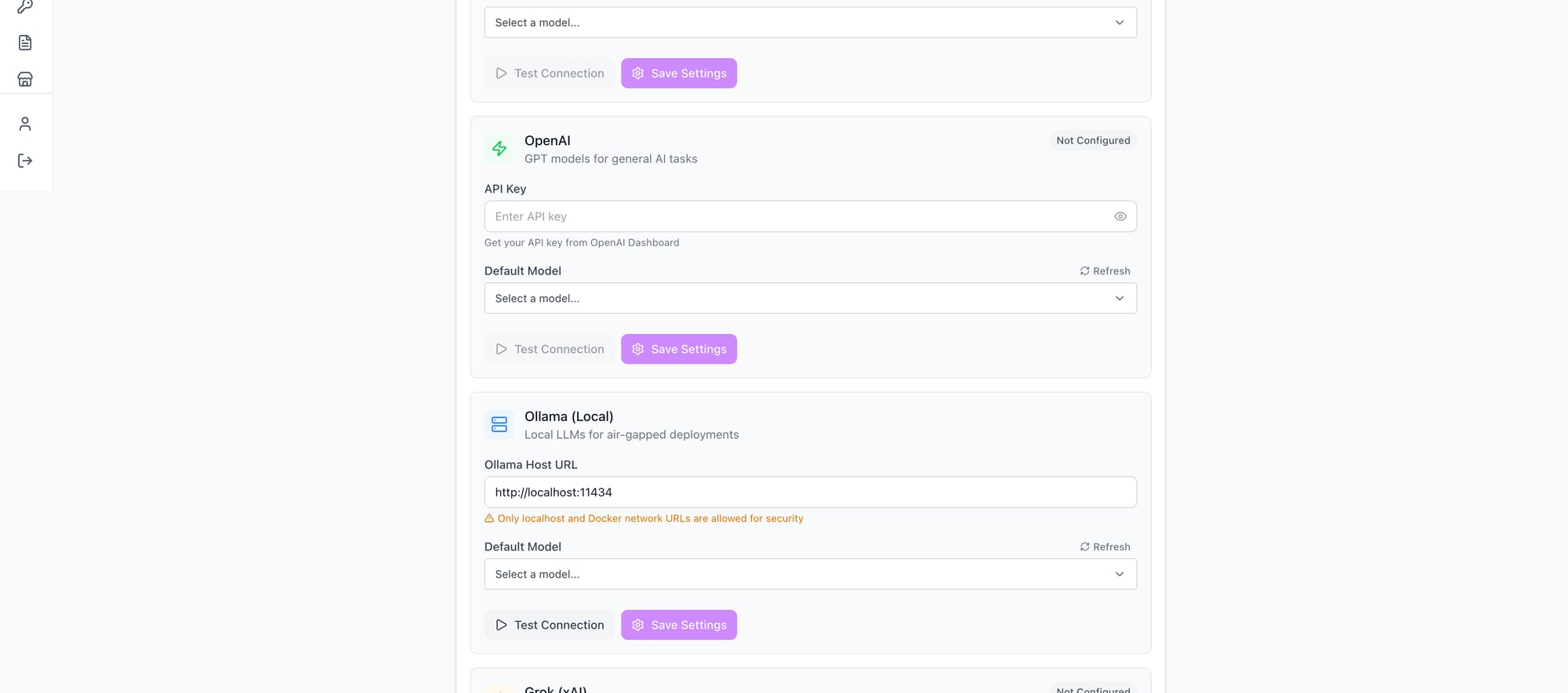 Four AI providers, one platform — from cloud APIs to fully air-gapped with local Ollama
Air-gapped deployment is a first-class citizen, not a workaround. Run Ollama for inference and Qdrant for vector storage on your own infrastructure. Your prompts, device data, knowledge base, and execution results never leave your network. Zero external API calls. Full functionality.
Credentials stay in your HashiCorp Vault. AI prompts are constructed without sensitive data — the platform injects device context without exposing passwords, community strings, or API keys. Token usage is visible per-node, so you always know what you’re spending.
The AI-Native Difference
This is where the architecture matters. Other platforms bolt AI onto existing features — a chatbot here, a summarizer there, each operating in its own silo with no awareness of the others.
AutomateNetOps.AI is different because every AI capability shares the same context layer:
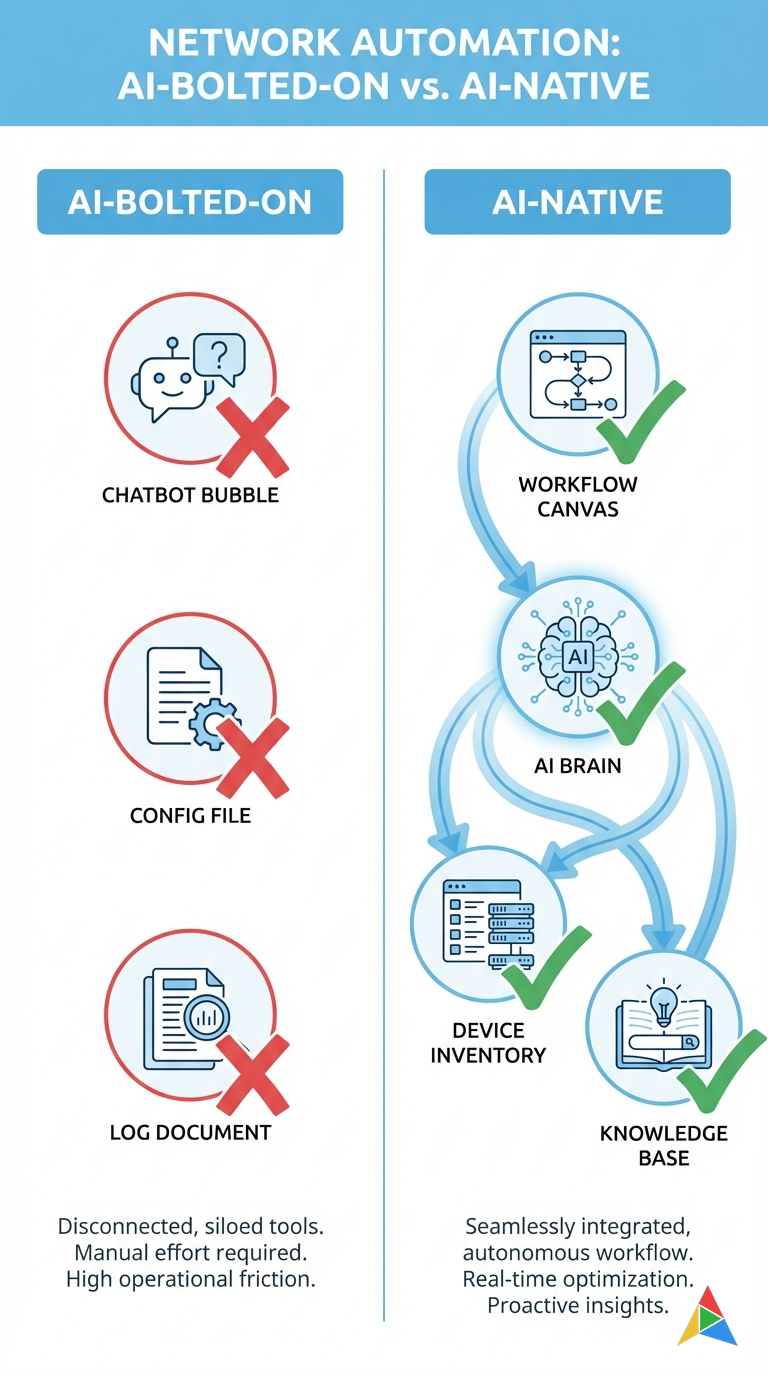 Click to zoom — AI-Native vs AI-Bolted-On: the architecture makes all the difference
| Capability | AI-Bolted-On | AI-Native (AutomateNetOps.AI) |
|---|---|---|
| Workflow Generation | Generic templates, no inventory awareness | Context-aware: knows your devices, credentials, patterns |
| Troubleshooting | Separate tool, manual log pasting | In-workflow node with full execution context |
| Knowledge Base | Disconnected wiki or chatbot FAQ | RAG-powered, auto-searched by every AI node |
| Validation | Regex and scripts | Natural language intents with confidence scoring |
| Copilot | Generic chat window | Persistent assistant aware of workflow state |
| Provider Flexibility | One vendor, take it or leave it | Four providers, configurable per-node |
| Air-Gapped Support | “Contact sales” | Ollama + Qdrant, fully local, out of the box |
The integration is the product. Workflow generation understands your device inventory. Troubleshooting nodes access execution context and your knowledge base. Intent validation feeds into compliance dashboards. The Copilot sees everything. Each feature makes the others more powerful.
Dashboard & Compliance — AI Results at a Glance
All of this AI capability means nothing if the results are buried three clicks deep. AutomateNetOps.AI surfaces AI-driven insights right where you need them.
The main dashboard gives you a bird’s-eye view of your entire automation estate: workflows, devices, pools, credentials, users, and executions — with AI-powered widgets that surface what matters:
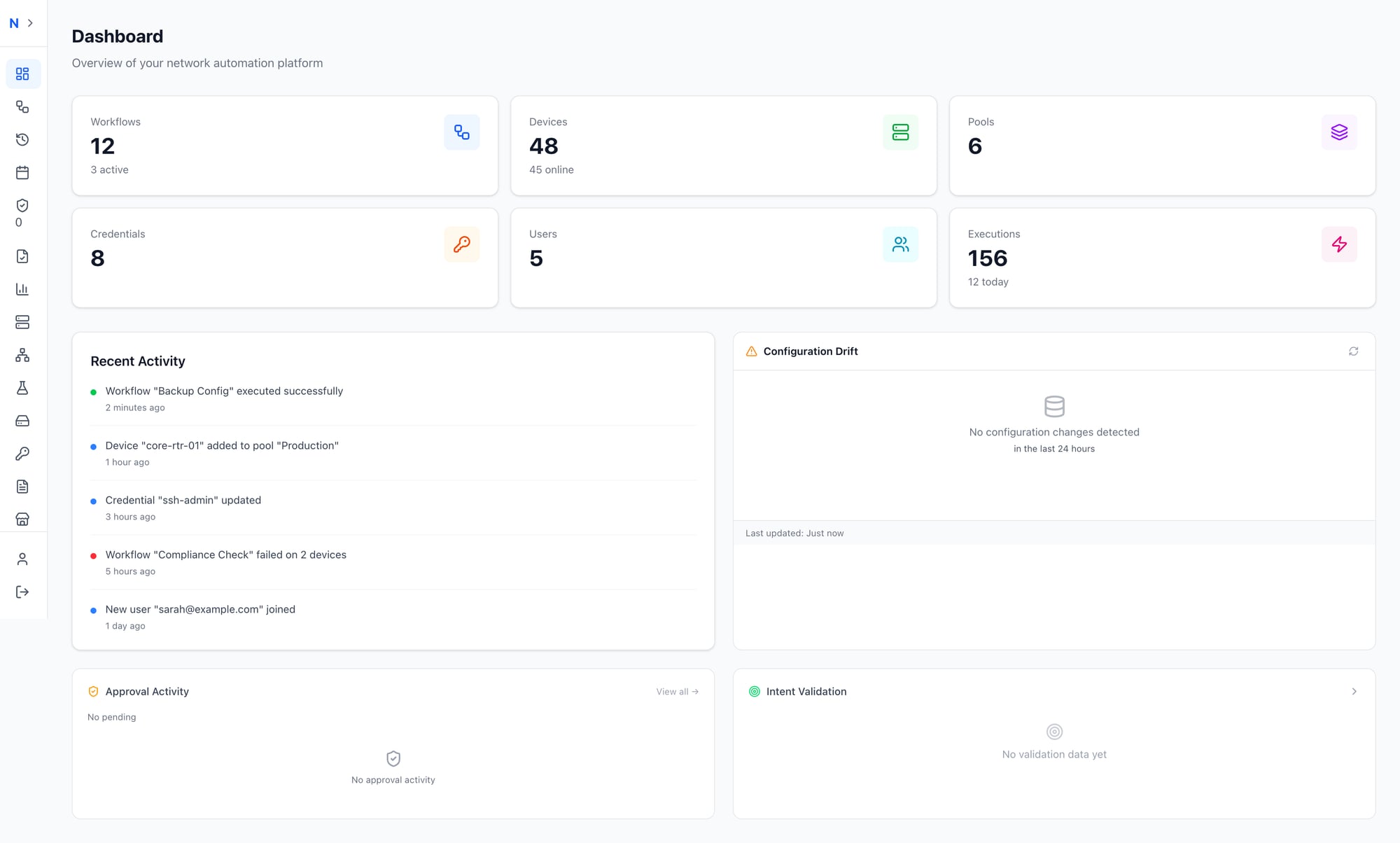 Your network at a glance — AI validation results, configuration drift, and activity feed all on one dashboard
- Intent Validation widget — See pass/fail results across your fleet at a glance
- Configuration Drift — Catch unauthorized changes before they cause incidents
- Approval Activity — Human-in-the-loop oversight for critical workflows
- Recent Activity — Real-time feed including compliance check failures
The dedicated Compliance Dashboard goes deeper, giving network managers and auditors the visibility they need:
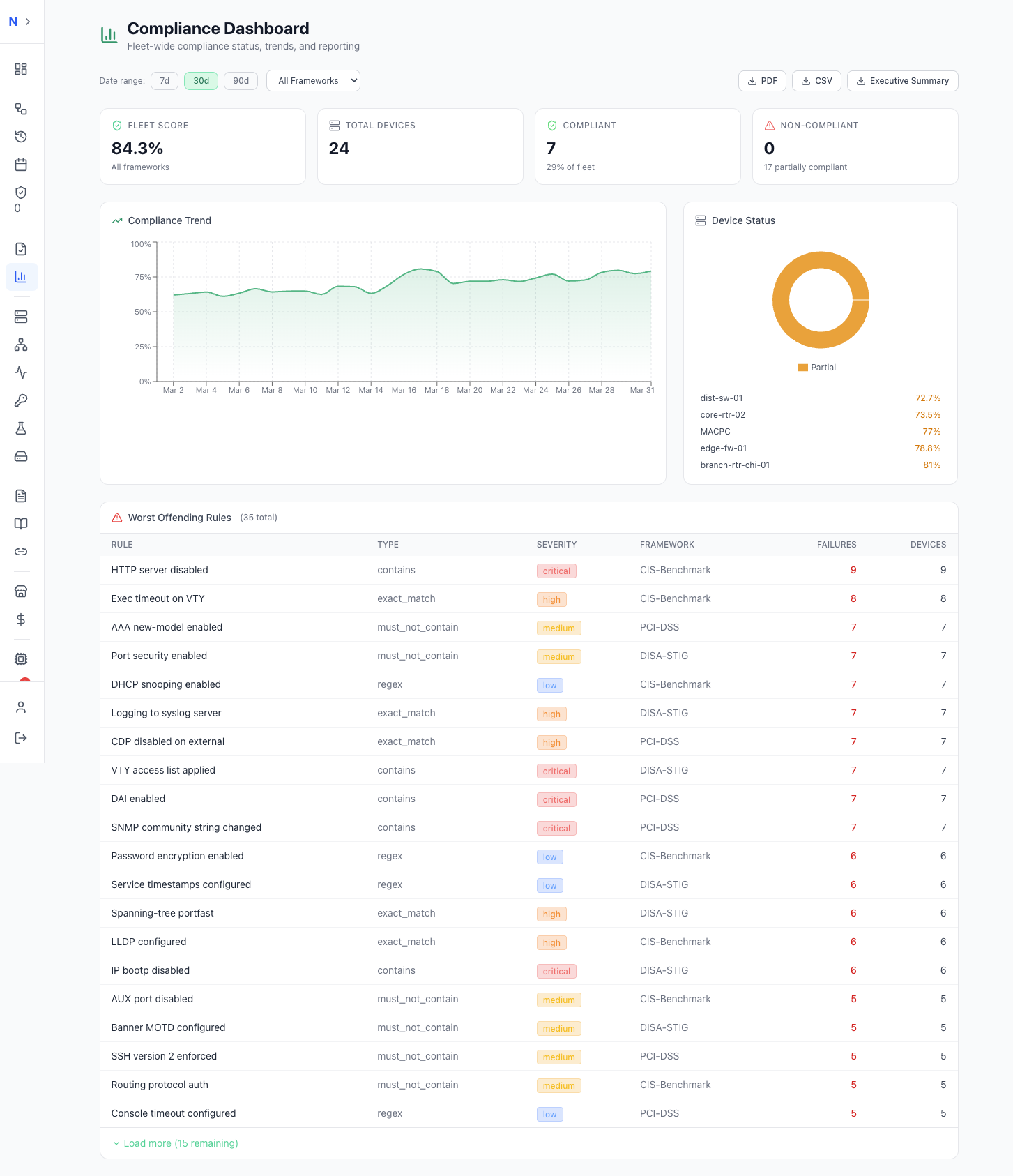 Track fleet-wide compliance with trend analysis, severity-ranked violations, and one-click audit reporting
- Fleet Score — A single number (e.g., 78.4%) representing compliance across all frameworks
- Compliance Trend — Track improvement or regression over 7, 30, or 90 days
- Device Status — Compliant vs. non-compliant breakdown
- Worst Offending Rules — Ranked by severity, framework, and failure count
- Export — PDF and CSV for audit reporting, plus AI-generated executive summaries
This is compliance that runs itself. Set up the workflows, define your intents, and the dashboards stay current automatically.
Get Started
The best way to understand AI-native automation is to try it. Here’s your five-minute path:
- Open the workflow designer
- Click the AI Assistant tab
- Type: “Create a backup workflow for all my Cisco devices”
- Watch the magic happen
- Click Apply and run it
You’ll build in 30 seconds what used to take 30 minutes. And once you’ve seen it, you’ll never go back to drag-and-drop-from-scratch again.
Get Started with AutomateNetOps.AI →
Have questions about AI-native automation? Contact our team — we’d love to show you what’s possible.
Tags: AI, AI-troubleshooting, automation, copilot, intent-validation, workflow-generation
Categories: Artificial Intelligence, Product
Updated:
You may also enjoy
Every network engineer knows the feeling. Finger hovering over “Execute,” heart rate slightly elevated, wondering what might break. Did you account for every...
About Me

Featured Articles
Ready to Automate?
See how AutomateNetOps.AI can transform your network operations with zero-trust security.