
Clone production into a lab — and rehearse every change before you ship it.
“Every network engineer has shipped a change that worked in the lab and failed in production. The honest reason is almost never the change. It’s that the lab didn’t quite match production — and nobody flagged the gap.”
If you’ve ever rolled back a change at 3 AM because the lab and production disagreed about how a vendor implements a feature, this article is for you.
We just shipped Regnor™ Lab Designer — a visual canvas that lets you design containerlab topologies, paste your existing YAML and get it back losslessly, clone a slice of real production onto the canvas in one click, and rehearse your actual production workflows against it. And then — the part that matters most — it tells you, per node, exactly how faithfully that lab represents production. Green for exact. Amber for near-substitute. Red for behavioral-gap.
A safe place to rehearse changes. Honest about its own fidelity.
The honest framing: a lab is only as useful as it is faithful.
The skeptic’s question is fair: isn’t every lab a little optimistic about how well it represents production? Mostly yes — and that’s exactly why we built the Fidelity & Substitution Advisor.
Hand-authored containerlab YAML drifts from reality the moment you save it. A virtual router standing in for hardware silently changes timing, queueing, and feature support. Nobody flags it. The lab passes. Production fails.
Regnor™ Lab Designer’s answer is a fidelity contract: every cloned node is classified as one of three tiers, the known gaps are enumerated inside the product, and you see — per node, before deploy — which workflow results to trust at face value and which to caveat. The lab isn’t pretending to be production. It’s telling you exactly how close it is.
That’s the differentiator. The rest of this article walks through how it works.
What ships today
Four capabilities, all proven by tests, all live in the product:
- Drag-to-design canvas with the full containerlab palette — Cisco IOL, Arista cEOS, Nokia SR Linux, Juniper, FRR, and more.
- Lossless YAML round-trip — paste your containerlab YAML and get it back intact, or get told exactly why not. Never a silent drop.
- Deterministic auto-layout — one Tidy action; the same graph tidies to byte-identical positions every time.
- Clone / Branch / Match from production — three producers, one shared fidelity envelope, one advisor.
Plus the hero flow: run your real production workflow against the lab, through the same execution engine and the same WebSocket stream you use in prod.
Capability 1 — Lossless YAML round-trip
The hard guarantee: for the modeled containerlab subset, YAML → graph → YAML is identity (modulo whitespace, key order, and quote-style canonicalization — never semantic loss). Anything outside the modeled subset is a structured 400 pointing at the unsupported feature.
We get there with three pieces of engineering:
- Lexical pre-scan, not post-parse traversal. YAML resolves anchors and merge keys during the load — by the time you walk the parsed object, they’re gone. So the parser scans the raw string for
&/*/<<:/!include/${...}/ custom tags before parsing. An anchor cannot be silently flattened because it’s rejected before the loader ever sees it. - Allowlist, not denylist. Every level of the parsed structure walks against an explicit allowlist. An unknown key is
unsupported_yaml_feature, not “accept and ignore.” When containerlab adds a feature, the parser must opt in — which forces test coverage to follow. - Frozen schema. The YAML loader is pinned to
CORE_SCHEMA(notDEFAULT_SCHEMA) to prevent type-coercion surprises and__proto__pollution.
A 40-test adversarial suite proves it. If you can craft a containerlab input that loses semantic information through the round-trip, we want to know — the test suite gets a new case.
What this means for you: you can paste in the containerlab YAML you already have, edit it on the canvas, export it back out, and check it into git next to your old one. The diff will be semantic. No surprise key-order churn that makes review unreadable.
Capability 2 — Deterministic auto-layout
One Tidy button. It classifies your topology (leaf-spine / hub-spoke / ring / force-directed fallback) and reflows every node in one dispatch.
The force-directed fallback is seeded by a PRNG keyed off sorted node IDs. No Math.random. No Date.now. The same graph tidies to byte-identical positions every time.
Why does that matter? Two reasons:
- Muscle memory. Your lab always tidies the same way. The node you used to find at the bottom-left is still there next week.
- Test fixtures don’t flake. A lab layout diff in CI is a real diff, not chart-noise.
A re-Tidy within ±2px is suppressed — no no-op write, no autosave fan-out. You get an “already tidy” toast instead.
Capability 3 — Clone / Branch / Match from production
This is the differentiator.
Three producers, all feeding one shared fidelity envelope contract:
 Match, Clone, and Branch all feed one shared fidelity-envelope contract — three producers, one shape, three timing semantics.
All three flow through the same advisor and the same lab_clone_snapshots envelope. The contract is one shape, used three ways.
The branch capability is the one to call out. If you’ve ever investigated an incident from last week and wished you could rebuild the network as it was during the failure window — Regnor™ Lab Designer does that. The Topology Time Machine resolves the historical topology; Branch-from-Production materializes it as a lab; the fidelity advisor classifies each node; you rehearse your fix against the network-as-it-was, not the network-as-it-is.
Capability 4 — Fidelity & Substitution Advisor
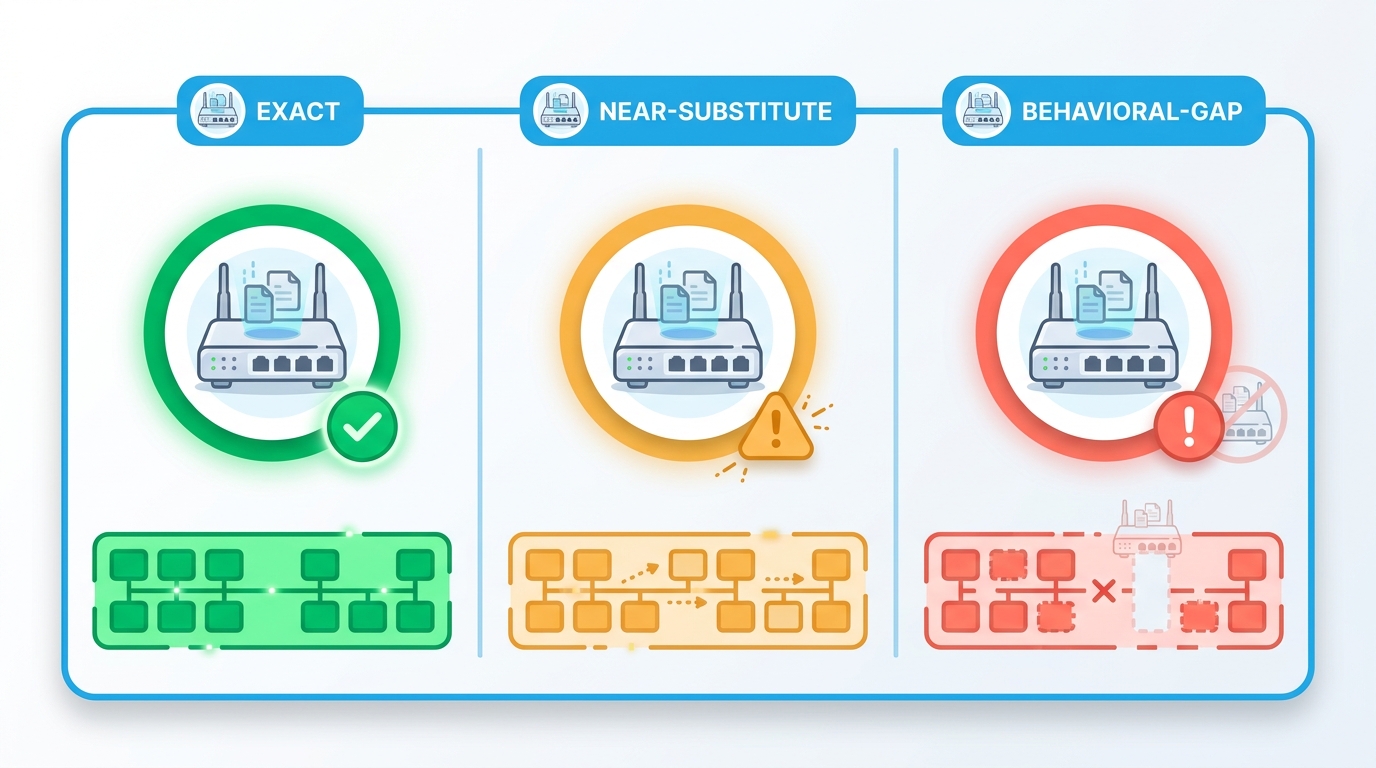 Every cloned node gets one of three classifications. The lab is explicit, per node, about how trustworthy a workflow result is.
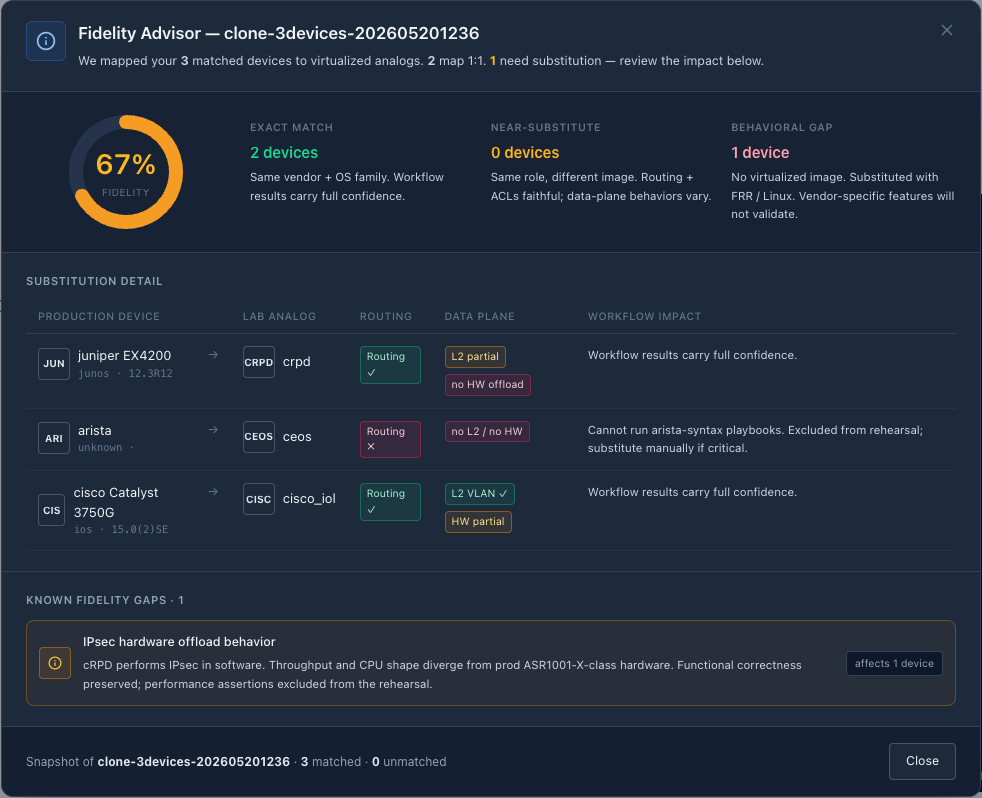 What it looks like in the product — the Fidelity Advisor opened from a Clone-from-Production action against a 3-device site. Per-device tier classification, vendor mapping, and per-feature workflow-impact verdicts.
This is the honesty layer.
When a clone or branch materializes, every node gets a fidelity classification:
- Green — Exact. We have an image that matches your production device’s vendor, model, and OS version. Workflow results against this node are as trustworthy as the lab can make them.
- Amber — Near-substitute. We have an image that’s close — same vendor, similar model, behaves similarly on most features. We’ll list the deltas you should know about. Workflow results are probably trustworthy. Caveat.
- Red — Behavioral gap. The real device does something the lab image cannot. We list the specific behaviors that diverge. Workflow results for this node should be reviewed by a human before you trust them in production.
The Advisor enumerates known gaps from a registry maintained inside the product (KNOWN_FIDELITY_GAPS). It’s not a black box. It’s not a “looks good to me.” It’s a list of named, citable divergences with rationale.
This is the answer to the skeptic’s question — “isn’t every lab a little optimistic about how well it represents production?” Yes, unless the lab is explicit about its own fidelity, node by node. Regnor™ Lab Designer is.
The hero flow: run your real workflow against the lab
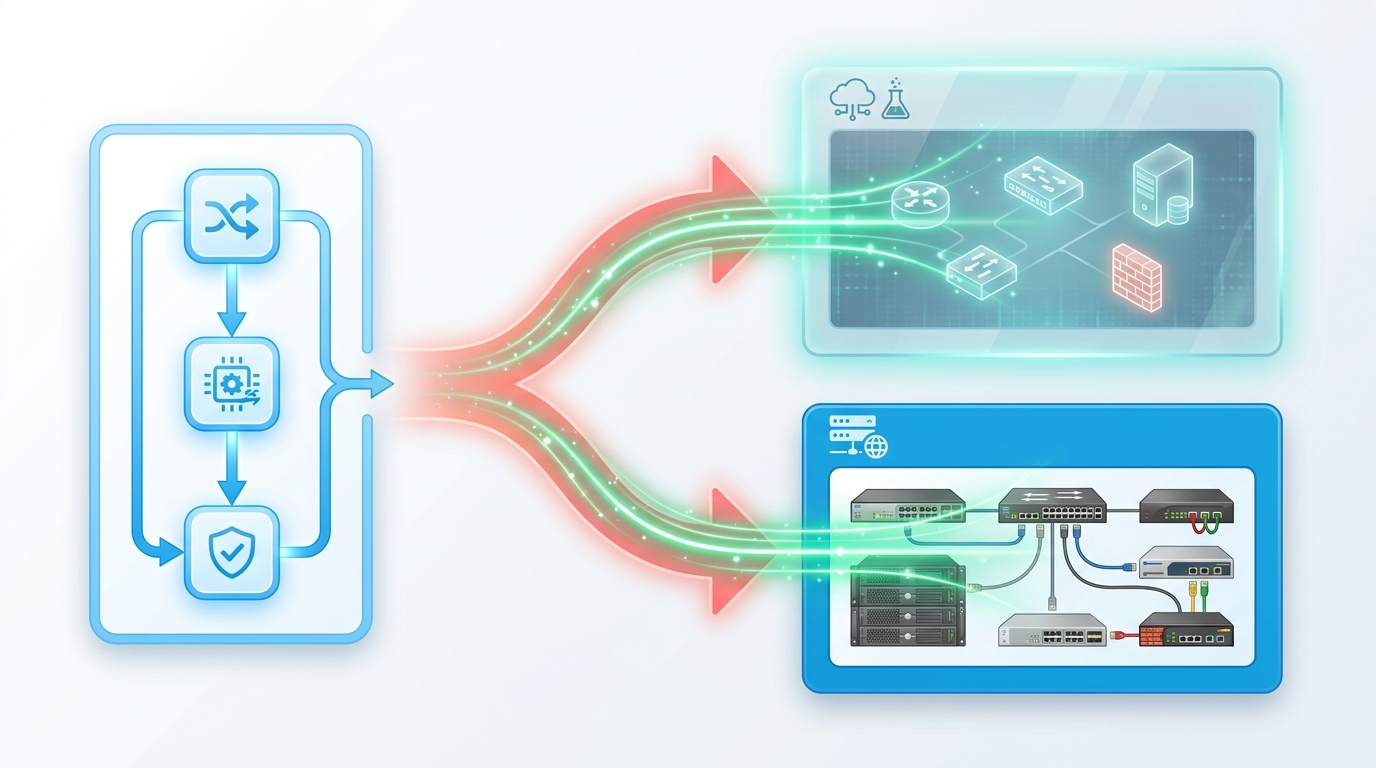 One workflow definition. Two possible runtime targets. Identical execution semantics — through the same engine and the same WebSocket stream.
This is what most “integrated lab” features get wrong: they spin up a virtual network, then ask you to run a separate “lab workflow” against it. Two workflows. Two sources of truth. Two opportunities for the lab and production behaviors to diverge.
Regnor™ Lab Designer runs the same workflow against the lab as you’d run against production — through the same execution engine, the same WebSocket stream, the same UI.
Click Test Workflow Here on the canvas. Pick a real production workflow. Watch it land node-by-node on the canvas via execution glow. Drill into per-device, per-step results in the execution rail. When you’re confident, change the target from lab to production and run for real.
Same workflow. Same engine. Safe target.
That’s the whole pitch. Lab faithfulness is a contract; workflow execution is identity. If your workflow passes against an all-green lab, you have real evidence — not a hope — that it’ll pass in production. If your workflow passes against a lab with one amber node and a documented gap, you know exactly which result to scrutinize.
What about the resilience model?
Lab runs are still lab runs. Things go wrong. Here’s what Regnor™ Lab Designer guarantees while a workflow runs:
- Sticky-failed devices. Once a device is marked failed, no later event silently downgrades it back to running or ok. Failures stay failures.
- Cross-execution event-leak guard. Events whose execution ID doesn’t match the active run are dropped — closes the resubscribe window when run B starts while run A’s executor is still emitting tail events.
- Orphan-event tolerance. An unknown node ID is logged, never thrown.
- Autosave paused during run. Tidy still works; it just doesn’t write. Your canvas state at run-start is preserved until the run ends.
- Single-active-run-per-lab. A partial unique index in the database makes “two simultaneous runs against the same lab” structurally impossible. Duplicate dispatch maps to a clean
409 LAB_HAS_ACTIVE_RUNresponse, not a race.
Four resilience banners cover the failure surface: agent-offline, stalled-step heuristic, stuck-execution (with an Abort button), and join-existing-run (for the case where you reload the page mid-run).
What this isn’t
We’re not promising your lab will perfectly model production. We’re promising the lab will tell you exactly where it doesn’t. Those are different claims, and the difference is the whole point.
We’re not promising containerlab supports every vendor. The supported palette is what containerlab supports plus the substitutions we’ve validated. When a vendor you need isn’t in the palette, the Advisor will tell you — it won’t pretend.
We’re not promising YAML comment preservation. Comments are dropped with a warning on round-trip; AST-level round-tripping was out of scope for v1. If you need comments, write them as description: fields, which round-trip losslessly.
How to try it
If you’re already on Regnor™ Cloud:
- Open any lab from the Labs page.
- Click Clone Production.
- Pick a site scope.
- Watch the canvas materialize.
- Click the Fidelity Advisor ring in the toolbar.
- Click Test Workflow Here.
If you’re not on Regnor™ Cloud yet — start the beta. Valdis™ deploys in one Docker Compose command. You’ll have a working lab against your own production within an hour.
What’s next
The next epic in flight composes Clone-from-Production + run-against-lab + Fidelity Advisor into a change-window workflow with a structured diff report and an approval gate. Click “Validate.” Watch your lab run pre-checks, apply the change, run post-checks. Get a structured diff back — reachability, routing-protocol deltas, segmentation rule changes, raw config diff. Approve. The same validated change dispatches against production. One WORM-sealed (Write-Once, Read-Many — a SOC 2 / ISO 27001 / FedRAMP / PCI requirement for tamper-evident audit records) evidence row carries both lab-validation and prod-dispatch outcomes for full audit lineage.
That’s the long arc. Today’s ship — Regnor™ Lab Designer — is the substrate that makes it possible.
Coming next on the blog
- Topology Time Machine + natural-language queries — “Ask your network a question in plain English — and the LLM never touches your database.”
- Tavrin™ Auto-Dispatch — “When the rule fires, the fix runs — and the evidence is WORM.”
- The Unified Document System — “One document surface, not a different attachment widget per feature.”
Regnor™, Valdis™, and Tavrin™ are trademarks of AutomateNetOps (registration pending). This article describes capabilities shipped as of 2026-05-25.
Tags: change-rehearsal, ci-for-networks, clone-from-production, containerlab, fidelity-advisor, lab-designer, network-automation, pre-prod, regnor
Categories: Lab Testing, Network Automation
Updated:
You may also enjoy
For the better part of a decade, the narrative in network operations has been one of steady improvement. We built better sensors. We deployed faster probes. ...
In today’s enterprise, the datacenter is no longer just a cost center. It is the operational backbone of revenue, customer experience, and competitive advant...
About Me
Featured Articles

Ready to Automate?
See how AutomateNetOps.AI can transform your network operations with zero-trust security.