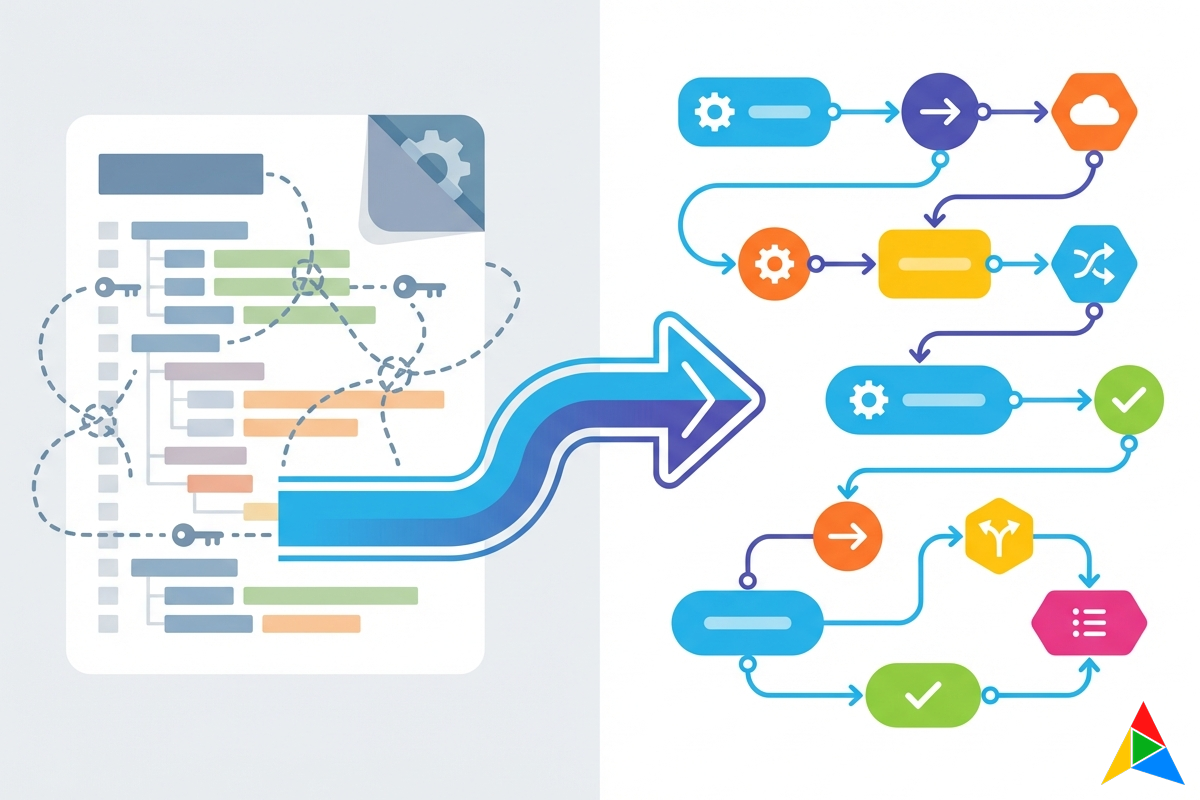
From Ansible Playbooks to Visual Workflows: A Migration Guide
You’ve been running Ansible for years. You have playbooks that configure switches, verify BGP neighbors, push compliance templates, and back up configurations. They work. Mostly.
But you also have playbooks that nobody wants to touch because the original author left. You have YAML files with nested roles three levels deep that take 20 minutes to debug when they fail. You have junior engineers who can run playbooks but can’t write them. And you have a growing sense that there has to be a better way.
There is. Visual workflow automation takes the logic you’ve built in Ansible and makes it visible, collaborative, and dramatically easier to maintain. This guide walks through the migration — not as a rip-and-replace, but as a practical evolution.
Why Migrate? (And Why Not Just Stay on Ansible)
Let’s be honest: Ansible is a good tool. If it’s working for your team and everyone can maintain the playbooks, there’s no urgent reason to change. But if you’re experiencing any of these pain points, visual workflows solve them:
1. The “Bus Factor” Problem Your most complex playbooks were written by one person who understood the intricate variable precedence, Jinja2 filters, and role dependencies. When that person is unavailable, nobody wants to modify those playbooks. Visual workflows make the logic visible to everyone — you can literally see what happens at each step.
2. YAML Fatigue Ansible’s YAML syntax is readable for simple tasks. But once you add conditionals, loops, error handling, block/rescue/always structures, and variable scoping, the YAML becomes a programming language — just one without a debugger, type system, or IDE support. Network engineers didn’t sign up to be YAML developers.
3. Limited Visibility During Execution When an Ansible playbook runs, you see a stream of task results scrolling by. If something fails on device 47 of 200, you’re scrolling through output to find it. Visual workflows show you exactly where execution is, which devices succeeded or failed, and what data flowed between each step — in real-time.
4. No Built-In Safety Net
Ansible’s --check mode is helpful but limited — many network modules don’t support it fully, and there’s no confidence scoring. Visual platforms offer dry-run simulation with mock responses and integrated lab testing against virtual devices before you touch production.
5. Credential Sprawl Ansible stores credentials in vault files, environment variables, or inventory vars. Managing credential rotation, access controls, and audit trails across multiple playbooks and inventories requires significant custom tooling.
The Migration Mindset: Evolution, Not Revolution
The worst migration strategy is “rewrite everything at once.” Instead, think of this as a phased transition:
Phase 1: New automation → visual workflows. Start building new workflows visually. Keep existing Ansible playbooks running.
Phase 2: High-value migrations. Identify the playbooks that cause the most pain — complex, frequently modified, or poorly documented — and migrate those first.
Phase 3: Gradual consolidation. Over time, migrate remaining playbooks as they need updates. Some simple, stable playbooks may never need migration, and that’s fine.
The key insight: You don’t have to choose one or the other. AutomateNetOps.AI includes an Ansible node type — you can literally call existing playbooks from within a visual workflow during the transition.
Mapping Ansible Concepts to Visual Workflows
If you know Ansible, you already know the concepts. The vocabulary changes, but the logic is the same:
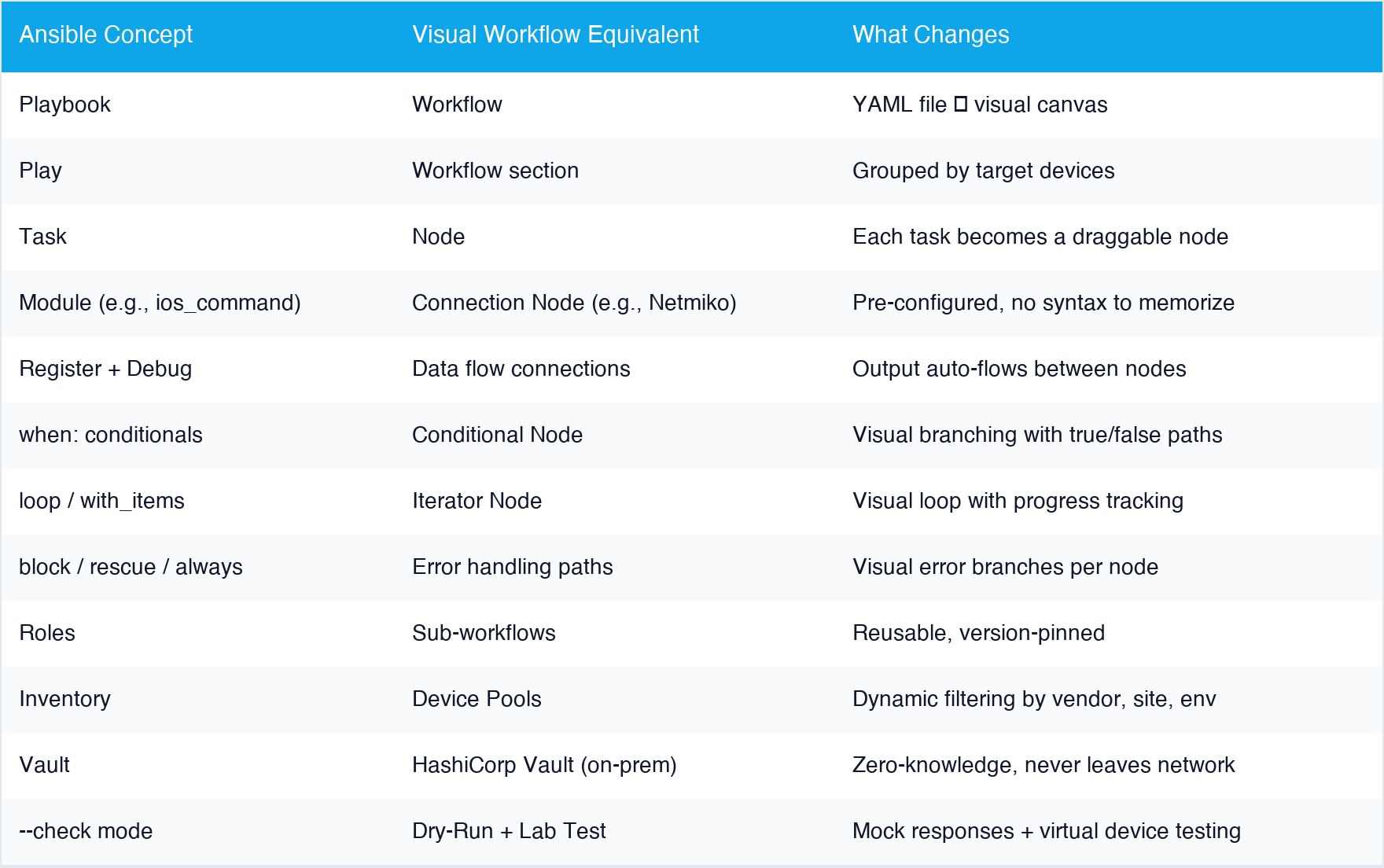 Click to zoom — every Ansible concept has a visual equivalent
Migration Example: BGP Neighbor Verification
Let’s walk through a real example. Here’s a common Ansible playbook that verifies BGP neighbors on Cisco IOS devices:
The Ansible Version
---
- name: Verify BGP Neighbors
  hosts: cisco_routers
  gather_facts: no
  vars:
    expected_state: "Established"

  tasks:
    - name: Get BGP summary
      cisco.ios.ios_command:
        commands:
          - show ip bgp summary
      register: bgp_output

    - name: Parse BGP output
      set_fact:
        bgp_neighbors: ""

    - name: Check neighbor states
      assert:
        that:
          - item.STATE_PFXRCD != 'Idle'
          - item.STATE_PFXRCD != 'Active'
        fail_msg: "BGP neighbor  is in  state"
        success_msg: "BGP neighbor  is healthy ()"
      loop: ""
      loop_control:
        label: ""

    - name: Send notification on failure
      uri:
        url: "https://hooks.slack.com/services/..."
        method: POST
        body_format: json
        body:
          text: "BGP verification failed on "
      when: bgp_check is failed
This works, but consider: How does a junior engineer understand the TextFSM parsing? What happens if the template path changes? How do you modify the notification target? Every change requires editing YAML.
The Visual Workflow Version
In AutomateNetOps.AI, this becomes a five-node workflow:
Node 1: Netmiko SSH
- Command:
show ip bgp summary - Target: Device pool “Cisco Routers”
- Credentials: Auto-resolved from Vault
Node 2: TextFSM Parser
- Template: Select “cisco_ios_show_ip_bgp_summary” from built-in library
- Input: Connected from Node 1 output
Node 3: Conditional
- Condition: Check each neighbor’s state
- True path → Node 5 (success notification)
- False path → Node 4 (failure alert)
Node 4: Notification (Failure)
- Channel: Slack webhook
- Message: Template with device name and failed neighbors
Node 5: Notification (Success)
- Channel: Email summary
- Message: All neighbors healthy
What’s different:
- The entire flow is visible at a glance — anyone can understand it
- TextFSM templates are selected from a dropdown, not referenced by file path
- Credentials are auto-resolved — no vault file management
- Error handling is visual — you see the failure path
- Any team member can modify the Slack webhook or add an additional notification without understanding YAML syntax
Migration Example: Configuration Compliance
Here’s another common pattern — checking device configurations against a golden standard:
The Ansible Version
---
- name: Check NTP Configuration
  hosts: all_switches
  gather_facts: no

  tasks:
    - name: Get running config
      cisco.ios.ios_command:
        commands:
          - show running-config | section ntp
      register: ntp_config

    - name: Verify NTP servers present
      assert:
        that:
          - "'ntp server 10.1.1.1' in ntp_config.stdout[0]"
          - "'ntp server 10.1.1.2' in ntp_config.stdout[0]"
          - "'ntp authentication-key' in ntp_config.stdout[0]"
        fail_msg: "NTP configuration non-compliant on "
      register: compliance_result
      ignore_errors: yes

    - name: Generate compliance report
      template:
        src: compliance_report.j2
        dest: "/reports/_ntp.txt"
      delegate_to: localhost

    - name: Remediate if non-compliant
      cisco.ios.ios_config:
        lines:
          - ntp server 10.1.1.1
          - ntp server 10.1.1.2
          - ntp authentication-key 1 md5
      when: compliance_result is failed
Now imagine you need to add a third NTP server, change the authentication key, and extend this check to Juniper devices. In Ansible, that’s editing YAML, adding Juniper-specific modules, managing different command syntax, and updating the Jinja2 report template.
The Visual Workflow Version
AutomateNetOps.AI handles this with the built-in compliance engine — no workflow required:
- Create a Golden Config Profile with rules:
- Must-contain:
ntp server 10.1.1.1 - Must-contain:
ntp server 10.1.1.2 - Must-contain:
ntp authentication-key
- Must-contain:
-
Assign to device types — the profile auto-applies to Cisco IOS, IOS-XE, Juniper Junos (rules adapt per vendor syntax)
-
Enable auto-remediation — non-compliant devices get corrected automatically
- Dashboard — fleet-wide compliance view with 7/30/90-day trending
Adding a third NTP server? Add one line to the golden config profile. Extending to Juniper? Already done — the profile applies to all assigned device types. No YAML editing, no playbook modifications.
What About My Existing Ansible Investment?
This is the question everyone asks, and the answer is: you don’t lose it.
The Ansible Node AutomateNetOps.AI includes a dedicated Ansible node type. You can call existing playbooks directly from a visual workflow:
- Point the node at your playbook file or Git repository
- Pass inventory and variables from the visual workflow
- Capture playbook output for downstream processing
- Mix Ansible nodes with native nodes in the same workflow
This means you can start migrating incrementally. Wrap your existing playbooks in visual workflows, add error handling and notifications visually, and replace individual Ansible tasks with native nodes over time.
Your Inventory Data Device pools in AutomateNetOps.AI support dynamic filtering by vendor, device type, site, environment, and custom tags. If you have a well-maintained Ansible inventory, you can replicate the same groupings. The platform also imports from CSV, YAML, or integrates with Nautobot/NetBox as a source of truth.
Your Templates TextFSM, TTP, and Jinja2 templates work natively in AutomateNetOps.AI — they’re node types with the same template syntax. Your existing templates transfer directly.
The Features You Gain
Migrating isn’t just about escaping YAML. You gain capabilities that Ansible doesn’t offer:
Lab Testing Before Production Click “Test in Lab” and the platform auto-generates a Containerlab topology with virtual devices matching your targets. Run the workflow against lab devices before touching production. No Ansible equivalent exists.
AI-Assisted Workflow Building Describe what you want in natural language: “Check BGP neighbors on all Cisco routers, parse the output, and alert Slack if any neighbor is down.” The AI generates the complete workflow. You review and adjust.
Approval Gates Insert human approval steps into any workflow. “Before pushing this config to 200 switches, get approval from the network lead.” With Ansible, this requires external tooling or manual workflow orchestration.
Dry-Run with Confidence Scoring
Run your workflow in simulation mode with mock device responses. Each node produces a confidence score indicating how realistic the simulation is. Ansible’s --check mode is binary — it either supports check mode or it doesn’t.
Real-Time Execution Visibility Watch your workflow execute node by node, device by device, with live data flow visualization. See exactly where you are in a 200-device rollout. Ansible gives you scrolling text output.
Immutable Audit Trail Every workflow execution, every parameter, every result is logged in a database-enforced immutable audit trail. Ansible logs are text files that can be modified or deleted.
Migration Checklist
Ready to start? Here’s your step-by-step plan:
Week 1: Setup
- Deploy an on-premise agent (one command from the Agent Dashboard)
- Import your device inventory into device pools
- Configure credentials in the local HashiCorp Vault
Week 2: First Workflow
- Pick a simple, well-understood playbook (device backup, show commands, health check)
- Recreate it as a visual workflow
- Test in dry-run mode, then lab mode, then against a small device group
- Compare results with the Ansible version
Week 3: Hybrid Operation
- Use the Ansible node to call complex existing playbooks from visual workflows
- Add visual error handling and notifications around existing playbooks
- Begin migrating one complex playbook to native visual nodes
Week 4: Expand
- Set up golden config profiles to replace compliance playbooks
- Configure scheduled workflows to replace cron-driven Ansible runs
- Onboard additional team members to the visual designer
Ongoing:
- Migrate playbooks as they need updates (don’t rewrite stable playbooks for no reason)
- Use AI workflow generation for new automation tasks
- Phase out Ansible nodes as native replacements prove reliable
The Bottom Line
Ansible got the network automation industry to where it is today. It proved that infrastructure could be automated at scale with code, and its community built an incredible ecosystem. Respect to what it’s accomplished.
But the next generation of network engineers shouldn’t need to learn YAML to automate their networks. Teams shouldn’t need a dedicated “playbook expert” to maintain their automation. And nobody should have to choose between cloud convenience and credential security.
Visual workflows aren’t a gimmick — they’re the same evolution we’ve seen in every other area of technology. From command-line database queries to visual query builders. From writing HTML by hand to drag-and-drop page builders. From shell scripts to CI/CD pipelines with visual editors.
Network automation is having that same moment right now. The question isn’t whether you’ll make this transition — it’s whether you’ll lead it or follow.
Ready to see your Ansible logic as a visual workflow? Join the AutomateNetOps.AI beta — bring your toughest playbook, and we’ll help you migrate it.
Related reading:
- Best Network Automation Tools in 2026 — see how Ansible compares to modern platforms
- Why On-Premise Matters for Network Automation Security — zero-trust credential architecture
- How AI is Changing Network Troubleshooting — AI copilot for workflow building
Currently running Ansible? Contact us for a migration assessment — we’ll identify which playbooks benefit most from visual workflows and which are fine as-is.
Tags: ansible, migration, network-automation, playbooks, regnor, tutorial, visual-workflows
Categories: Network Automation, Tutorials
Updated:
You may also enjoy

For the better part of a decade, the narrative in network operations has been one of steady improvement. We built better sensors. We deployed faster probes. ...

In today’s enterprise, the datacenter is no longer just a cost center. It is the operational backbone of revenue, customer experience, and competitive advant...
About Me

Featured Articles


Ready to Automate?
See how AutomateNetOps.AI can transform your network operations with zero-trust security.